
SQL Views: Virtual Tables, Materialized Views & Schema Modification (2026)

Key Takeaways
- A View Stores No Data — A standard SQL view stores only a saved query definition. Every time it is queried, the DBMS executes the underlying SQL against live base tables. No physical storage is consumed.
- Materialized Views Store Data — A materialized view physically caches the query result on disk. Queries are instant, but the data is only as fresh as the last
REFRESH. Essential for data warehousing and analytics. - Updatability Has Rules — A view is updatable only if it maps 1-to-1 to a single base table with no DISTINCT, GROUP BY, aggregates, or JOINs. Complex views are mathematically non-updatable.
- WITH CHECK OPTION Enforces Integrity — Appending
WITH CHECK OPTIONto a view definition prevents any INSERT/UPDATE through the view from producing rows that would immediately vanish from the view's own filter. - DROP CASCADE Cleans Up Dependents —
DROP TABLE name CASCADErecursively drops all views that depend on the table. WithoutCASCADE, the command fails if any view references the table.
A SQL View is a named, saved query — a virtual table with no physical data storage. Every SELECT against it re-runs the underlying query on the live base tables
Materialized Views physically store the query result on disk for instant reads — data is stale until explicitly REFRESHed (complete or incremental)
Updatable views allow INSERT/UPDATE/DELETE passed through to the base table — only possible when the view maps 1-to-1 to a single base table without aggregates, JOINs, or DISTINCT
WITH CHECK OPTION enforces that writes through a view cannot produce rows invisible to that view's WHERE clause
ALTER TABLE modifies existing table structure (add/modify/drop columns); DROP TABLE destroys the table and all data permanently
DROP TABLE ... CASCADE automatically removes all dependent views, preventing orphaned invalid view definitions
What Is a SQL View?
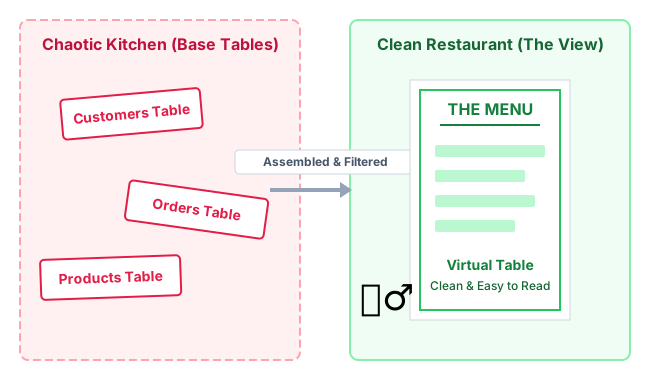
A relational database typically contains dozens of highly normalized tables — raw, technical structures optimized for storage efficiency, not human usability. A junior developer or business analyst should not need to write 12-table JOIN queries just to fetch a sales report. And a contractor should absolutely not have access to every column in a sensitive Patients table to deliver meals.
A SQL View is a named, saved query definition stored in the database's system catalog. It presents data from one or more base tables as if it were a single, simple virtual table — but stores absolutely no data itself. Views are the primary mechanism for data abstraction, security enforcement, and query simplification in relational databases.
CREATE VIEW: Syntax & Examples
A view is created using the CREATE VIEW statement followed by a SELECT query. The view definition is saved to the database's system catalog (the Data Dictionary) — not to a physical data file.
Basic Syntax
-- Standard CREATE VIEW syntax
CREATE [OR REPLACE] VIEW view_name [(column_alias_list)]
AS
SELECT ...
FROM ...
[WHERE ...]
[WITH [CASCADED | LOCAL] CHECK OPTION];
-- Example 1: Security masking — hide sensitive columns
CREATE VIEW vw_PatientMealPrep AS
SELECT PatientID, FirstName, LastName, RoomNumber, DietRestriction
FROM Patients;
SSN, InsuranceDetails, MedicalHistory columns are invisible to anyone with only VIEW access
-- Example 2: Simplify a complex multi-table join for developers
CREATE VIEW vw_ActiveOrderDetails AS
SELECT o.OrderID, c.CustomerName, c.Email,
p.ProductName, p.Price, o.Quantity,
o.OrderDate, s.StatusDescription
FROM Orders o
JOIN Customers c ON o.CustomerID = c.CustomerID
JOIN Products p ON o.ProductID = p.ProductID
JOIN OrderStatus s ON o.StatusID = s.StatusID
WHERE s.StatusDescription = 'Active';
Developer now writes: SELECT * FROM vw_ActiveOrderDetails WHERE CustomerName = 'Priya'
Instead of rewriting the 4-table JOIN every time
How the DBMS Resolves a View Query
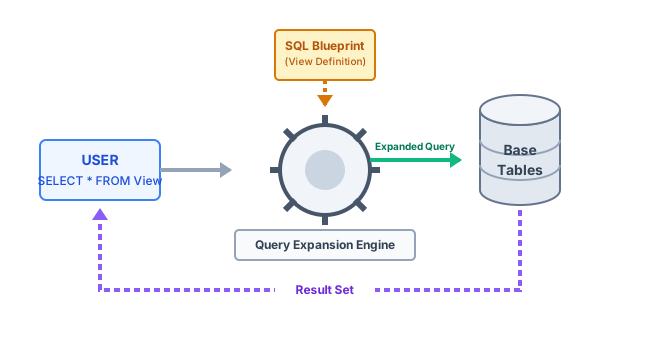
When a user queries a view, no separate physical table is read. The DBMS performs query expansion (view resolution):
- User submits:
SELECT * FROM vw_ActiveOrderDetails WHERE CustomerName = 'Priya' - DBMS intercepts and looks up
vw_ActiveOrderDetailsdefinition in the Data Dictionary. - Query Expansion: The DBMS merges the user's
WHERE CustomerName = 'Priya'with the view's full 4-table JOIN definition into one combined query. - Query Optimizer builds an optimal execution plan (choosing indexes, join order, parallel scans) for the combined query.
- Execution against base tables — the physical data is fetched, assembled in memory, and returned. The virtual table vanishes after the query completes.
Updatable vs Non-Updatable Views
A view is updatable if INSERT, UPDATE, or DELETE operations issued against the view can be unambiguously translated into equivalent operations on the underlying base table(s). The SQL standard defines strict conditions that determine updatability.
Conditions for Updatability
| View Feature | Updatable? | Reason |
|---|---|---|
| Single base table, no aggregates | ✅ YES | Every view row maps 1-to-1 to a base row — update is unambiguous |
| Single table with WHERE filter | ✅ YES | Filtered view of one table — updates go directly to the matching base row |
| JOIN across multiple tables | ❌ NO | DBMS cannot determine which base table receives the update for a given view row |
| GROUP BY / HAVING | ❌ NO | View rows represent aggregated groups, not individual base rows |
| Aggregate functions (SUM, COUNT, AVG) | ❌ NO | Computed values — there is no single base column to update |
| DISTINCT keyword | ❌ NO | Multiple base rows may collapse into one view row — reverse mapping is ambiguous |
| UNION / INTERSECT / EXCEPT | ❌ NO | View rows may come from different tables — insertion target is undefined |
| Subquery in SELECT list | ❌ NO | Derived column has no direct base column to write to |
-- ✅ UPDATABLE view: single table, no aggregates, no JOIN
CREATE VIEW vw_MumbaiCustomers AS
SELECT CustomerID, Name, Email, City
FROM Customers
WHERE City = 'Mumbai';
-- This UPDATE passes directly to the Customers base table
UPDATE vw_MumbaiCustomers SET Email = '[email protected]' WHERE CustomerID = 42;
-- ❌ NON-UPDATABLE view: uses aggregate SUM + GROUP BY
CREATE VIEW vw_CitySalesTotal AS
SELECT City, SUM(Amount) AS TotalSales
FROM Orders JOIN Customers USING (CustomerID)
GROUP BY City;
-- ERROR: Cannot update — TotalSales is computed; multiple base rows map to one view row
UPDATE vw_CitySalesTotal SET TotalSales = 99999 WHERE City = 'Delhi'; -- FAILS
WITH CHECK OPTION: Enforcing View Integrity
A subtle but dangerous flaw can arise with updatable views. A user can insert a row through the view that violates the view's own WHERE clause — the row silently enters the base table but immediately becomes invisible in the view. This phantom insert pollutes the underlying data without the user ever seeing the evidence.
-- WITHOUT CHECK OPTION: dangerous phantom insert
CREATE VIEW vw_MumbaiCustomers AS
SELECT CustomerID, Name, City FROM Customers WHERE City = 'Mumbai';
-- Insert a Delhi customer THROUGH the Mumbai view — no error!
INSERT INTO vw_MumbaiCustomers (CustomerID, Name, City) VALUES (101, 'Raj', 'Delhi');
Result: Raj is now in the Customers base table with City='Delhi'
But Raj is INVISIBLE in vw_MumbaiCustomers (WHERE City='Mumbai' filters him out)
The base table is silently corrupted with incorrect city data
-- WITH CHECK OPTION: prevents phantom inserts
CREATE VIEW vw_MumbaiCustomers AS
SELECT CustomerID, Name, City FROM Customers WHERE City = 'Mumbai'
WITH CHECK OPTION;
-- Now the same insert is REJECTED with a constraint violation
INSERT INTO vw_MumbaiCustomers VALUES (101, 'Raj', 'Delhi');
ERROR: new row for relation "customers" violates WITH CHECK OPTION for view "vw_mumbaicustomers"
-- This insert SUCCEEDS (City='Mumbai' satisfies the view's WHERE clause)
INSERT INTO vw_MumbaiCustomers VALUES (102, 'Aisha', 'Mumbai'); -- OK ✅
-- CASCADED vs LOCAL check option for nested views
CREATE VIEW vw_MumbaiPremium AS
SELECT * FROM vw_MumbaiCustomers WHERE Tier = 'Premium'
WITH CASCADED CHECK OPTION; /* enforces parent view clause too */
Materialized Views: Caching for Analytics Performance
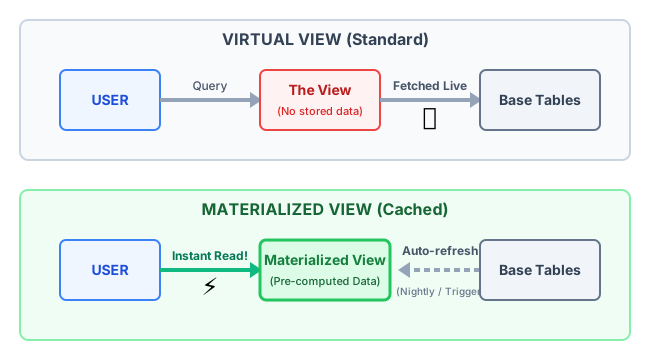
A Materialized View is a physical snapshot of a query result stored on disk. Unlike a standard virtual view — which re-executes its underlying SQL on every access — a materialized view pre-computes and caches the result. Subsequent queries read from the cache, achieving response times orders of magnitude faster than re-running complex analytical queries on billion-row tables.
-- PostgreSQL: Create a materialized view (executes and stores data immediately)
CREATE MATERIALIZED VIEW mv_MonthlyRevenue AS
SELECT
DATE_TRUNC('month', o.OrderDate) AS Month,
c.Region,
SUM(o.Amount) AS TotalRevenue,
COUNT(o.OrderID) AS OrderCount,
AVG(o.Amount) AS AvgOrderValue
FROM Orders o
JOIN Customers c ON o.CustomerID = c.CustomerID
GROUP BY 1, 2
WITH DATA; /* executes query and stores result now */
-- Standard refresh: complete (drops old data, re-executes full query)
REFRESH MATERIALIZED VIEW mv_MonthlyRevenue;
-- Non-blocking refresh: allows reads during refresh (requires UNIQUE index)
REFRESH MATERIALIZED VIEW CONCURRENTLY mv_MonthlyRevenue;
-- Schedule automatic nightly refresh (using pg_cron extension)
SELECT cron.schedule('0 2 * * *', 'REFRESH MATERIALIZED VIEW mv_MonthlyRevenue');
This runs at 02:00 every night — CEO dashboard loads instantly at 08:00
| Feature | Virtual View | Materialized View |
|---|---|---|
| Physical Storage | Zero — only the query definition | High — actual result rows on disk |
| Query Performance | Slower — full query re-executed each time | Instant — reads pre-computed cache |
| Data Freshness | 100% real-time — always current | Stale — only fresh after REFRESH |
| Primary Use Case | Security, query simplification, OLTP | Data warehousing, dashboards, OLAP |
| Indexable? | ❌ Cannot index a virtual view | ✅ Can add indexes to materialized views |
| SQL Standard Support | All RDBMS | PostgreSQL, Oracle, SQL Server (indexed views), MySQL 8+ |
DROP VIEW: Removing View Definitions
The DROP VIEW statement removes a view's definition from the system catalog. It does not affect the base tables or their data in any way — only the saved query definition is removed.
-- Basic DROP VIEW (fails if other views depend on this view)
DROP VIEW vw_MumbaiCustomers;
-- DROP VIEW IF EXISTS (no error if view does not exist)
DROP VIEW IF EXISTS vw_MumbaiCustomers;
-- DROP VIEW CASCADE (also drops all views that depend on this view)
DROP VIEW vw_MumbaiCustomers CASCADE;
This also drops vw_MumbaiPremium (which was built on top of vw_MumbaiCustomers)
-- Drop multiple views in one statement
DROP VIEW IF EXISTS vw_SalesReport, vw_CustomerSummary, vw_ActiveOrders;
-- Drop a materialized view
DROP MATERIALIZED VIEW IF EXISTS mv_MonthlyRevenue;
This DOES delete the stored data in the materialized view cache
ALTER TABLE: Modifying Existing Schema
ALTER TABLE is the SQL DDL command for modifying the structure of an existing table without dropping and recreating it. It is one of the most common and impactful operations a DBA performs in production — requiring careful planning because schema changes affect all dependent views, queries, and application code.
-- Add a new column (safe — new column is NULL by default for existing rows)
ALTER TABLE Customers ADD COLUMN PhoneNumber VARCHAR(15);
ALTER TABLE Customers ADD COLUMN CreatedAt TIMESTAMP DEFAULT NOW() NOT NULL;
-- Modify a column type (DANGEROUS — existing data must be compatible)
ALTER TABLE Products ALTER COLUMN Price TYPE DECIMAL(15,4);
-- Rename a column (will break dependent views that reference old column name)
ALTER TABLE Customers RENAME COLUMN Email TO EmailAddress;
⚠ Any view using Customers.Email will become invalid after this rename
-- Drop a column (DANGEROUS — data is permanently lost)
ALTER TABLE Orders DROP COLUMN DiscountCode;
-- Add a constraint to existing column
ALTER TABLE Products ADD CONSTRAINT chk_price_positive CHECK (Price > 0);
-- Add a foreign key constraint
ALTER TABLE Orders
ADD CONSTRAINT fk_orders_customers
FOREIGN KEY (CustomerID) REFERENCES Customers(CustomerID) ON DELETE CASCADE;
-- Rename the table itself
ALTER TABLE Customers RENAME TO Client;
⚠ All views referencing 'Customers' will break — must be updated manually
DROP TABLE & CASCADE: Schema Modification Operations
DROP TABLE permanently destroys a table and all its data. Unlike DELETE FROM table (which removes rows but preserves the table structure), DROP TABLE removes both the data and the schema definition — it is irreversible without a backup.
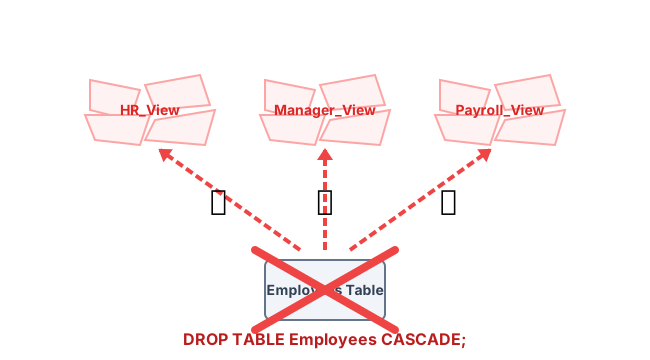
-- DROP TABLE without CASCADE (fails if any view or FK references this table)
DROP TABLE Products;
ERROR: cannot drop table products because other objects depend on it
DETAIL: view vw_ActiveOrderDetails depends on table products
-- DROP TABLE CASCADE (drops table + all dependent views, constraints, triggers)
DROP TABLE IF EXISTS Products CASCADE;
⚠ This permanently deletes all Products rows AND drops vw_ActiveOrderDetails
-- TRUNCATE: delete all rows but keep the table structure (faster than DELETE FROM)
TRUNCATE TABLE OrderHistory;
Table structure and indexes remain; only data is removed; auto-resets sequences
-- Check what depends on a table before dropping (always do this first!)
SELECT dependent_ns.nspname, dependent_view.relname AS view_name
FROM pg_depend
JOIN pg_rewrite ON pg_depend.objid = pg_rewrite.oid
JOIN pg_class AS dependent_view ON pg_rewrite.ev_class = dependent_view.oid
JOIN pg_class AS source_table ON pg_depend.refobjid = source_table.oid
JOIN pg_namespace AS dependent_ns ON dependent_ns.oid = dependent_view.relnamespace
WHERE source_table.relname = 'products';
| Command | Removes Data? | Removes Structure? | Rollback-able? | Speed |
|---|---|---|---|---|
| DELETE FROM tbl | ✅ Yes (rows) | ❌ No | ✅ Yes (transactional) | Slow (row-by-row WAL) |
| TRUNCATE tbl | ✅ Yes (all rows) | ❌ No | ⚠ Varies by DB | Very fast (page deallocation) |
| DROP TABLE | ✅ Yes (all rows) | ✅ Yes (schema) | ❌ No (DDL is auto-committed) | Instant |
| DROP TABLE CASCADE | ✅ Yes + dependent objects | ✅ Yes + all dependent views | ❌ No | Instant |
| DROP VIEW | ❌ No (view has no data) | ✅ Yes (view definition) | ❌ No | Instant |
Real-World Case Study: Healthcare PII Security Masking
| Aspect | Details |
|---|---|
| The Setup | A large hospital network maintained a Patients table containing SSNs, insurance details, diagnosis codes, medication history, and room numbers. External contractors were hired to build a meal-delivery scheduling application. |
| The Risk | Granting contractors direct SELECT access to the Patients table would expose all PII — a catastrophic HIPAA violation triggering fines up to $1.9M per incident. |
| The Solution | CREATE VIEW vw_MealPrep AS SELECT PatientID, FirstName, LastName, RoomNumber, DietRestriction, AllergyFlag FROM Patients;Contractor accounts were granted GRANT SELECT ON vw_MealPrep TO meal_app_user. The base table REVOKE was applied. |
| The Result | Contractors received exactly the data needed — real-time room and diet information. The view made it physically impossible to SELECT SSN or SELECT InsuranceID — those columns simply did not exist in the view. Zero HIPAA risk. Zero data duplication. |
| The Lesson | Views are the most cost-effective security control in a relational database. They require zero additional storage, zero performance overhead for security filtering, and provide an audit-friendly, declarative access control layer that row-level security (RLS) alone cannot match for column-level restrictions. |
Key Statistics & Industry Data (2026)
- Materialized View Speed Gain — Implementing Materialized Views in large-scale OLAP environments reduces average dashboard query load times by over 90% compared to standard virtual views on billion-row aggregation queries. (Source: Snowflake Data Warehouse Performance Benchmarks, 2025)
- Security — Breach Prevention — Over 65% of internal privilege escalation data breaches could be mitigated by enforcing strict View-based column access controls rather than granting base-table SELECT permissions to application service accounts. (Source: Verizon DBIR 2025)
- Materialized View CPU Cost — Automatic incremental refresh of Materialized Views consumes an average of 15% of background CPU resources in large cloud data warehouses (BigQuery, Redshift, Snowflake) during scheduled refresh windows. (Source: Google Cloud BigQuery Pricing Documentation, 2026)
- WAL Replication via Views — PostgreSQL logical replication can be configured to replicate specific views rather than entire tables — reducing replication bandwidth by up to 70% in column-sparse workloads where only specific columns are needed by replica consumers. (Source: PostgreSQL Logical Replication Documentation, 2025)
Where SQL Views Are Applied
Security & Column-Level PII Masking
Creating views that expose only non-sensitive columns (name, room) while hiding SSN, medical records, and financial data. Contractors and junior staff access the view; base table access is fully revoked.
Developer Workflow Simplification
Wrapping a 12-table JOIN query into a single named view (vw_ActiveOrders) lets junior developers issue simple SELECT statements without understanding the full normalized schema.
OLAP Dashboard Caching (Materialized)
Pre-computing weekly revenue reports, customer segmentation, and funnel metrics at 2 AM as materialized views — CEO dashboards and BI tools load in milliseconds at business hours.
Backward Compatibility During Migrations
When renaming or restructuring base tables, a view with the old column names keeps legacy application queries working without modification while the new schema is adopted incrementally.
Row-Level Data Isolation
Regional managers see only their region's sales data via a view filtered by RegionID = SESSION_VARIABLE(). Centralizes row-level security logic in the database layer rather than scattering it across application code.
Reporting & Audit Trail Simplification
Compliance auditors query a single view (vw_AuditTrail) that joins transaction logs, user tables, and timestamp tables — all complexity is hidden in the view definition.
Advantages of SQL Views
- Security — views provide column-level and row-level access control at the database layer, completely independent of application code. Sensitive columns are mathematically inaccessible through the view
- Query Simplification — complex multi-table JOINs, filters, and calculations are encapsulated once in the view definition, eliminating code duplication across dozens of application queries
- Backward Compatibility — when the physical schema changes (column rename, table split), views with the old column names shield all dependent applications from breaking
- Performance Caching (Materialized) — materialized views reduce complex aggregation query times from minutes to milliseconds by pre-computing and caching results
- Data Independence — the logical data model exposed through views can evolve independently of the physical storage model beneath it
Limitations & Pitfalls of SQL Views
- Performance Illusion — a simple SELECT * FROM vw_SalesReport may secretly trigger a 10-minute JOIN across billion-row tables; developers unaware of the underlying complexity will blame the database for slowness
- View Dependency Fragility — renaming or altering a base table column silently breaks all dependent views; production incidents from untracked view dependencies are common during schema migrations
- Non-Updatability — most analytical views (JOIN, GROUP BY, aggregates) are non-updatable, frustrating developers who expect views to behave exactly like tables for write operations
- Materialized View Staleness — materialized view data is only as fresh as the last REFRESH; in fast-changing OLTP databases, stale cache can cause business decisions based on outdated numbers
- Nested View Performance — deeply nested views (view on view on view) compound query expansion overhead, causing the optimizer to struggle with unrolling multiple layers of logic into a single efficient plan
Quick Reference Cheat Sheet
Complete Views and Schema Modification command reference.
| Command / Term | Definition | Exam Tip |
|---|---|---|
| CREATE VIEW | Saves a SELECT query as a named virtual table in the system catalog | Stores zero bytes of data — only the query definition |
| CREATE OR REPLACE VIEW | Redefines an existing view without dropping it — preserves grants | Safer than DROP + CREATE because existing privileges are not lost |
| WITH CHECK OPTION | Ensures INSERT/UPDATE through the view only creates rows visible in the view | Prevents phantom inserts that violate the view's WHERE clause |
| DROP VIEW | Removes the view definition — base table data is completely unaffected | Does NOT delete data; only removes the saved query |
| CREATE MATERIALIZED VIEW | Executes the query and stores the result physically on disk | Requires explicit REFRESH to update cached data; can be indexed |
| REFRESH MATERIALIZED VIEW | Re-executes the underlying query and updates the stored cache | CONCURRENTLY variant allows reads during refresh (needs UNIQUE index) |
| Updatable View | A view where INSERT/UPDATE/DELETE transparently apply to the base table | Requires: single base table, no aggregates, no JOIN, no DISTINCT |
| Non-Updatable View | A view that cannot accept writes because the reverse mapping is ambiguous | Caused by: JOIN, GROUP BY, HAVING, aggregates, DISTINCT, UNION |
| ALTER TABLE ADD COLUMN | Adds a new column to an existing table (safe — NULL for all existing rows) | Most ALTER operations require a table lock — run during low-traffic windows |
| ALTER TABLE DROP COLUMN | Permanently removes a column and its data | Check view dependencies first — views referencing this column break |
| DROP TABLE | Permanently destroys the table and all data — irreversible without backup | Fails if dependent views exist (use CASCADE to also drop them) |
| DROP TABLE ... CASCADE | Drops table + recursively drops all dependent views and foreign key references | Most dangerous DDL command — always check dependencies before running |
| TRUNCATE TABLE | Deletes all rows (like DELETE FROM with no WHERE) but keeps table structure and indexes | Much faster than DELETE for large tables — skips row-level WAL logging |
Frequently Asked Questions (FAQ)
Q.Does deleting a View delete the actual data?
Q.Can I create a View based on another View (nested views)?
Q.How does the database refresh a Materialized View?
Q.Why do I get an error when I try to UPDATE through a View?
Q.What happens to a View if I rename or drop the underlying base table?
Q.What is the difference between CREATE VIEW and CREATE MATERIALIZED VIEW?
Q.What does WITH CHECK OPTION do in a View?
Related Topics
Test Your Knowledge
Ready to prove your skills? Take our rigorous multiple-choice quiz designed to test your understanding of this topic and prepare you for interviews.