
Cyber Forensics
🎯 Key Takeaways & Definition
Definition: Cyber Forensics (or Digital Forensics) is the application of investigation and analysis techniques to gather and preserve evidence from a computing device in a way that is suitable for presentation in a court of law.
Core Concept: It is the "CSI" of the digital world. The goal is to answer: Who did it, When did they do it, and How did they do it?
The Golden Rule: Preserve the Evidence. Never alter the original data during the investigation.
1. Definition of Cyber Forensics
Cyber forensics is the scientific process of identifying, preserving, extracting, and documenting computer evidence. Unlike standard troubleshooting, forensics focuses on legal admissibility. If you find a hacker's file but change the "Last Modified" date by opening it, that evidence might be thrown out of court.
Why Cyber Forensics Matters:
Legal Prosecutions:
- • Criminal cases: Hacking, fraud, child exploitation
- • Civil cases: Intellectual property theft, contract disputes
- • Evidence standards: Must meet legal requirements (Daubert/Frye standards)
Incident Investigation:
- • Determine attack timeline
- • Identify attacker tactics, techniques, procedures (TTPs)
- • Support incident response decisions
Statistics:
- • 73% of organizations conduct forensic investigations post-breach
- • Average investigation cost: $1.5M for large breach
- • Evidence rejection rate: 15% due to poor chain of custody
2. Objectives of Cyber Forensics
Recover Data 💾
Finding deleted, encrypted, or damaged files.
Techniques:
- • Undelete recovery: Files marked deleted but data remains
- • Carving: Extract files from raw disk sectors
- • Decryption: Break weak encryption, use known passwords
- • Data recovery: Repair corrupted file systems
Identify the Culprit ðŸ”
Tracing the IP address or user account responsible for the attack.
Methods:
- • Log analysis: Track user actions (login times, file access)
- • Network forensics: Follow IP addresses through routers
- • Metadata analysis: Document author, creation timestamps
- • Attribution: Link evidence to specific person
Prosecute ⚖️
Producing a report that stands up to legal scrutiny in criminal or civil court.
Requirements:
- • Chain of custody: Unbroken evidence tracking
- • Expert testimony: Forensic analyst explains findings
- • Admissibility: Follows legal standards (Federal Rules of Evidence)
- • Reproducibility: Another expert can verify findings
Fix Loopholes 🔧
Understanding how the breach happened to prevent it from recurring.
Outcomes:
- • Patch vulnerabilities
- • Update security policies
- • Improve detection mechanisms
- • Security awareness training
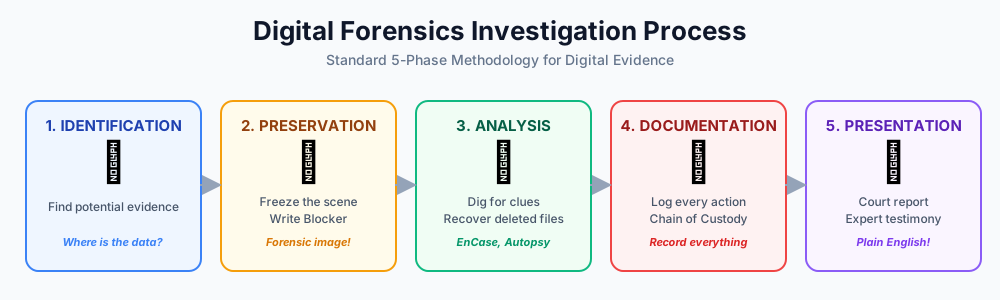
3. The Cyber Forensics Lifecycle (The 5 Phases)
This is the standard process used by law enforcement and corporate investigators.
Phase 1: Identification 🔎
Goal: Determining what evidence exists and where it is stored.
Action: Is the evidence on a laptop? A server? A cloud account? A USB stick?
Key Questions:
- • What type of incident occurred?
- • What devices are involved?
- • What time period is relevant?
- • Who had access?
Evidence Sources:
- • Endpoints: Laptops, desktops, servers
- • Mobile devices: Smartphones, tablets
- • Network devices: Routers, firewalls, switches
- • Cloud services: AWS, Google Drive, Office 365
- • Physical media: USB drives, external HDDs, backup tapes
Documentation:
- • Device make/model/serial numbers
- • Physical location
- • Who owns device
- • Network configuration
Phase 2: Preservation 🔒 (CRITICAL STEP)
Goal: Securing the data so it cannot be tampered with.
Action: Using a Write Blocker to make an exact "Bit-by-Bit" copy (Forensic Image) of the hard drive. Investigators never work on the original drive.
Why This Matters:
- • Original = Evidence: Must remain untouched
- • OS modifies files: Even viewing files changes metadata
- • Court requirement: Prove data not altered
Write Blocker:
Suspect Hard Drive → Write Blocker → Forensic Workstation
                     ↑
                Blocks ALL write commands
                Allows only read operations
Types:
- • Hardware write blocker: Physical device (Tableau, CRU WiebeTech)
- • Software write blocker: OS-level protection (less reliable)
Forensic Imaging:
1. Connect suspect drive via write blocker
2. Use imaging tool (FTK Imager, dd, EnCase)
3. Create bit-by-bit copy (every sector, including deleted data)
4. Generate hash (MD5, SHA-256) of original
5. Generate hash of copy
6. Hashes must match (proves exact copy)
7. Store original in evidence locker (never touched again)
8. Work only on the copy
Hash Verification:
Original Drive: SHA-256 = abc123def456...
Forensic Copy:  SHA-256 = abc123def456...
Match = Verified Exact Copy ✓
Live System Considerations:
- • Running system? Consider memory capture before shutdown
- • Encryption? May need to image while powered on (encryption keys in RAM)
- • Remote system? Network-based acquisition
Phase 3: Analysis 🔬
Goal: Extracting meaningful data from the forensic image.
Action: Recovering deleted files, cracking passwords, and analyzing web history and email headers using tools like EnCase or Autopsy.
Analysis Techniques:
File System Analysis:
- • Browse directory structure
- • Recover deleted files (unallocated space)
- • Timeline creation (when files created/modified/accessed)
- • Identify file types (by signature, not extension)
Registry Analysis (Windows):
- • User accounts (SAM hive)
- • Recently opened files (RecentDocs)
- • USB device history (USBSTOR)
- • Installed programs
Browser History:
- • Visited websites (Chrome/Firefox history databases)
- • Cookies (session tracking)
- • Cache (images, HTML)
- • Downloads
Email Analysis:
- • Email headers (trace sender IP)
- • Attachments
- • Deleted emails (PST/OST recovery)
Network Artifacts:
- • IP addresses contacted
- • Network shares accessed
- • VPN connections
Malware Analysis:
- • Identify malicious files (hash comparison with known malware)
- • Analyze suspicious processes
- • Reverse engineering (advanced)
Keyword Searching:
- • Search for relevant terms (company secrets, profanity, etc.)
- • Regular expressions (credit card patterns)
Tools:
- • Commercial: EnCase, FTK (Forensic Toolkit), X-Ways
- • Open-source: Autopsy, Sleuth Kit, Volatility (memory)
Phase 4: Documentation ðŸ“
Goal: Keeping a detailed log of every action taken.
Action: "I connected Drive A at 10:00 AM using Cable B." If you don't document it, it didn't happen.
What to Document:
Chain of Custody:
- • Who collected evidence
- • Date/time collected
- • Where stored
- • Who accessed it
- • Every transfer of custody
Investigation Actions:
- • Every tool used (name, version)
- • Every command executed
- • Every file examined
- • Every finding
Technical Details:
- • Hardware specifications
- • Software versions
- • Hash values
- • Screenshots
Timeline:
- • Chronological sequence of events
- • User actions
- • System events
Notes:
- • Observations
- • Interpretations
- • Questions for follow-up
Why Critical:
- • Legal requirement: Evidence trail must be complete
- • Reproducibility: Another expert can verify
- • Cross-examination: Withstand attorney questioning
Phase 5: Presentation 📊
Goal: Presenting findings to a non-technical audience (Judge/Jury).
Action: Writing a final report that explains the technical data in simple English.
Report Structure:
1. Executive Summary:
- • Key findings in plain language
- • Who, what, when, where, how
2. Scope:
- • What was examined
- • What was not examined
- • Limitations
3. Methodology:
- • Tools used
- • Processes followed
- • Standards applied (NIST, ISO)
4. Findings:
- • Evidence discovered
- • Timeline of events
- • Attribution (who did it)
5. Conclusions:
- • Expert opinion
- • Answers to investigative questions
6. Appendices:
- • Technical details
- • Screenshots
- • Log extracts
- • Chain of custody
Presentation Tips:
- • Avoid jargon: "The suspect accessed..." not "The UID traversed..."
- • Visual aids: Screenshots, timelines, diagrams
- • Tell a story: Connect evidence into narrative
- • Anticipate questions: Be prepared for cross-examination
Expert Witness Role:
- • Explain technical concepts
- • Defend methodology
- • Withstand cross-examination
- • Remain neutral (facts, not opinions)
4. Types of Cyber Forensics
A. Disk Forensics 💽
Extracting data from storage media (Hard drives, SSDs, USBs).
Focus:
- • File system analysis
- • Deleted file recovery
- • Timeline reconstruction
- • Partition analysis
Challenges:
- • Encryption: BitLocker, FileVault (need keys)
- • SSDs: TRIM command erases deleted data
- • Large capacity: TB-sized drives take hours to image
B. Network Forensics ðŸŒ
Monitoring and analyzing network traffic (Packet Sniffing) to find intrusion attempts.
Data Sources:
- • Packet captures (PCAP): Wireshark, tcpdump
- • Firewall logs: Allowed/blocked connections
- • IDS/IPS alerts: Snort, Suricata
- • DNS logs: Domain name lookups
- • Proxy logs: Web requests
Analysis:
- • Identify attacker IP addresses
- • Reconstruct attack timeline
- • Extract files transferred
- • Detect command-and-control (C2) traffic
Challenges:
- • Volume: Massive data (TB per day)
- • Encryption: HTTPS/TLS hides content
- • Ephemeral: Traffic disappears if not captured
C. Mobile Forensics 📱
Recovering data from smartphones (SMS, Call Logs, GPS).
Data Types:
- • Call logs: Incoming/outgoing calls
- • SMS/MMS: Text messages, pictures
- • Contacts: Address book
- • Location: GPS history, cell tower data
- • Apps: WhatsApp, Snapchat, dating apps
- • Photos/videos: Gallery, deleted images
Extraction Methods:
- • Logical: Access file system (like USB drive)
- • Physical: Bit-by-bit dump (root/jailbreak needed)
- • Cloud: iCloud, Google backup
Tools:
Cellebrite, Oxygen Forensics, XRY
Challenges:
- • Encryption: iOS Secure Enclave, Android FDE
- • Pattern locks: Brute force or bypass
- • App sandboxing: Can't access without root
- • Updates: New OS versions break tools
D. Memory Forensics 🧠
Analyzing the computer's RAM (Volatile Memory) to find malware that doesn't save itself to the hard disk.
Why RAM?
- • Malware hides in memory: Fileless attacks
- • Encryption keys: Stored in RAM while system running
- • Running processes: What's executing right now
- • Network connections: Active communications
- • Passwords: Typed recently
Process:
- Capture RAM dump (DumpIt, FTK Imager, WinPMEM)
- Analyze with Volatility Framework
- Extract processes, network connections, registry keys
What's Found:
- • Hidden malware processes
- • Injected code
- • Encryption keys (before shutdown)
- • Open network sockets
- • Recently typed text
Challenge: RAM is volatile - power loss = data gone forever
⚠️ Chain of Custody (The Legal Backbone)
The Chain of Custody is a legal document that tracks the movement of evidence.
It records:
- ✓ Who collected the evidence
- ✓ When they collected it
- ✓ Where it was stored
- ✓ Who handled it (every person)
Why It Matters:
If there is a 1-hour gap in the log where the hard drive is unaccounted for, the defense lawyer will argue that someone could have planted false evidence during that time.
Broken Chain = Case Dismissed ⚖️
Example Chain of Custody Log:
Date/Time       | Person        | Action              | Location
----------------|---------------|---------------------|------------------
2026-02-09 10:00| Det. Smith    | Seized laptop       | 123 Main St
2026-02-09 10:30| Det. Smith    | Transport to lab    | Evidence Room A
2026-02-09 11:00| Analyst Jones | Received for imaging| Lab B
2026-02-09 14:00| Analyst Jones | Imaging complete    | Lab B
2026-02-09 14:15| Analyst Jones | Stored in locker    | Evidence Vault 5
2026-02-09 15:00| Lt. Williams  | Retrieved for court | Evidence Vault 5
Every gap must be explained:
- • Lunch break? Document it.
- • Overnight? Evidence locker secured.
- • Weekend? Explain who had access.
Signature Required: Each person signs when receiving/transferring evidence.
5. Order of Volatility ⏱️ (EXAM TOPIC)
When arriving at a crime scene, what do you collect first? You must collect the data that disappears the fastest.
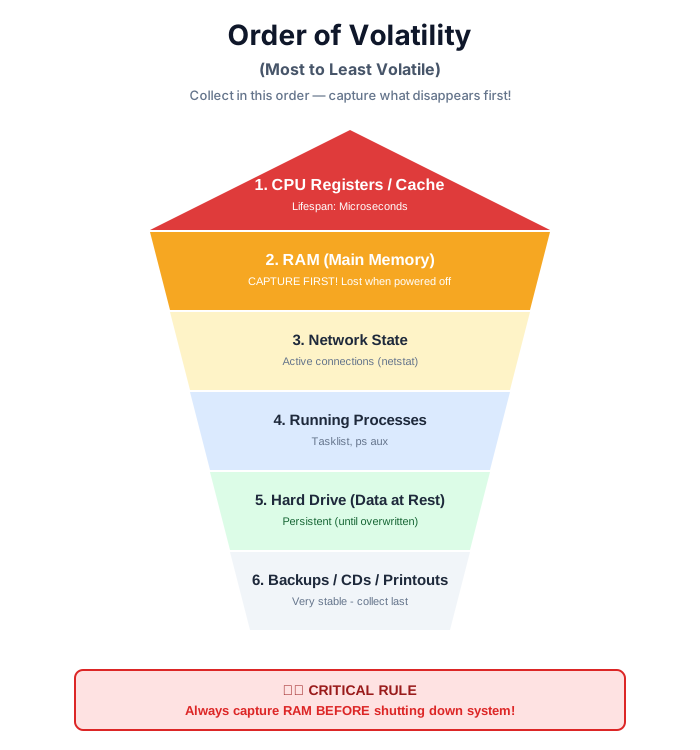
The RFC 3227 Order (Most to Least Volatile):
1. CPU Registers / Cache ⚡
- • Lifespan: Microseconds
- • Action: Usually not captured (too fast, requires specialized tools)
2. RAM (Main Memory) 🧠
- • Lifespan: Lost when power off
- • Action: CAPTURE IMMEDIATELY before shutdown
Critical Data in RAM:
- • Running processes
- • Open network connections
- • Encryption keys
- • Recently typed passwords
- • Clipboard contents
- • Malware in memory (fileless)
Tools: DumpIt, FTK Imager Memory, WinPMEM
3. Network State ðŸŒ
- • Lifespan: Changes constantly
- • Action: Capture active connections
Commands:
netstat -ano    # Windows: Active connections
ss -tulpn       # Linux: Socket statistics
arp -a          # ARP cache (MAC addresses)
4. Running Processes ðŸƒ
- • Lifespan: Can terminate any moment
- • Action: List all processes
Commands:
tasklist        # Windows
ps aux          # Linux
5. Hard Drive (Data at Rest) 💽
- • Lifespan: Persistent (until overwritten)
- • Action: Create forensic image
Less urgent (data doesn't disappear), but still important.
6. Backups / Removable Media 💾
- • Lifespan: Very stable
- • Action: Secure and image
Least volatile - can be collected last.
RULE:
Always capture RAM (Memory) before pulling the power plug, because RAM contains a "snapshot" of running malware. Once power is lost, RAM is gone forever.
Live vs Dead Acquisition:
Live Acquisition (System Running):
- ✅ Capture RAM (encryption keys, malware)
- ✅ Network connections visible
- ⌠Modifies system (some changes inevitable)
Dead Acquisition (System Off):
- ✅ No further changes to system
- ✅ Clean forensic image
- ⌠RAM lost
- ⌠Encryption may lock data
Best Practice: Live capture RAM first, then power down and image disk.
Conclusion
Cyber Forensics bridges the gap between Technology and Law. While Incident Response focuses on survival (getting the business back online), Forensics focuses on justice (proving who did it).
Key Takeaways:
- ✅ 5-Phase Process: Identification → Preservation → Analysis → Documentation → Presentation
- ✅ Golden Rule: Never alter original evidence (work on forensic copies)
- ✅ Write Blocker: Hardware device prevents modifications
- ✅ Chain of Custody: Unbroken evidence tracking (legal requirement)
- ✅ Order of Volatility: RAM first, disk second (most to least volatile)
- ✅ Hash Verification: MD5/SHA-256 proves data integrity
- ✅ Legal Admissibility: Evidence must meet court standards
- ✅ Expert Testimony: Forensic analyst explains findings in court
For a forensic investigator, the integrity of the data is more important than the speed of recovery.
The Future:
- • AI-powered forensics
- • Cloud forensics challenges
- • IoT device analysis
- • Quantum computing threats
These technologies will reshape digital investigations! ðŸ”