
Malware
Key Takeaways & Definition
- ● Definition: Malware (short for Malicious Software) is defined as any software intentionally designed to cause damage to a computer, server, client, or computer network.
- ● Core Concept: Unlike software bugs (which are accidental), malware is created with malicious intent to steal data, disrupt operations, or extort money.
- ● Key Types: The most common forms include Viruses, Worms, Trojans, and Ransomware.
Definition of Malware
Malware is the collective term for all malicious software. It is the primary tool used by cybercriminals to compromise systems. Whether it is stealing credit card numbers, deleting files, or turning a computer into a "bot" for a larger attack, malware is the weapon of choice.
In 2026, malware has become:
- ● More sophisticated with AI-driven evasion techniques
- ● More profitable through ransomware-as-a-service (RaaS)
- ● More targeted with spear-phishing and zero-day exploits
- ● More persistent using rootkits and fileless malware
Think of malware as digital parasites—they invade systems, consume resources, and cause harm while often hiding their presence.
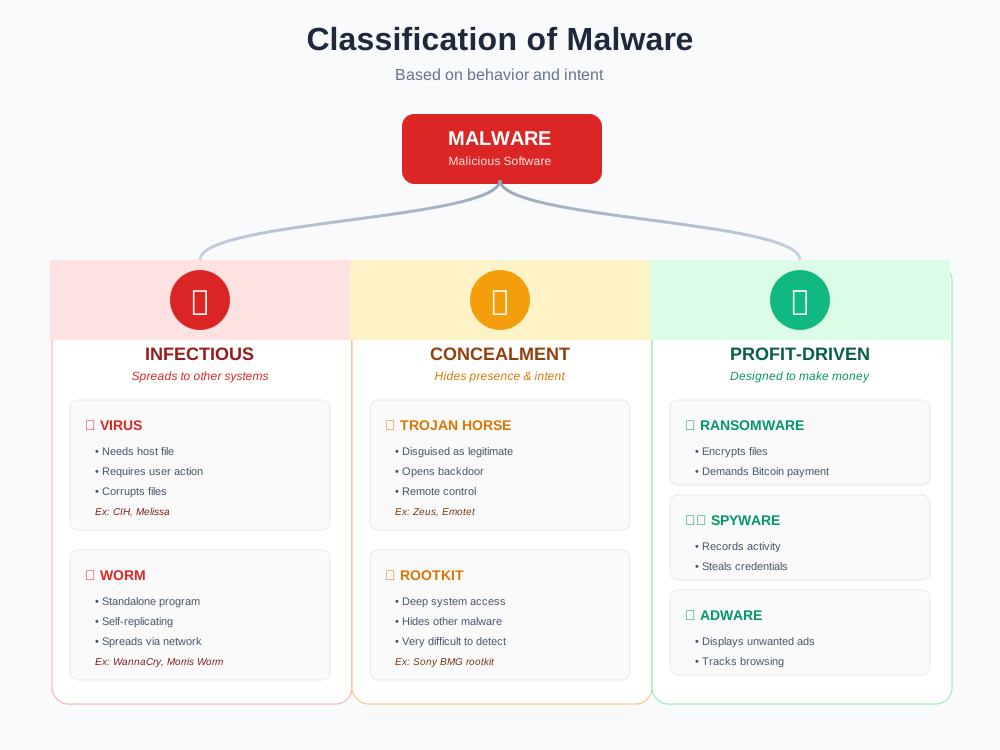
Types of Malware
Malware is categorized based on how it spreads and what damage it causes.
1. Virus 🦠
Definition:
A piece of code that inserts itself into a legitimate program (called the Host) and runs when the user executes that program.
Mechanism:
It requires human action to spread (e.g., opening an infected .exe file or sharing a USB drive).
Key Trait:
"I need a host to survive."
How it works:
- User downloads infected file
- User opens/executes the file
- Virus code activates and copies itself to other files
- Spreads when infected files are shared
Types of Viruses:
- ● File Infector: Attaches to .exe or .com files
- ● Boot Sector: Infects the boot sector of hard drive
- ● Macro Virus: Spreads through Microsoft Office documents
- ● Polymorphic: Changes its code to avoid detection
Example:
- ● CIH (Chernobyl) Virus: Overwrote BIOS, bricking computers
- ● Melissa (1999): Spread via Word documents, infected 1 million PCs
2. Worm ðŸ›
Definition:
A standalone program that replicates itself to spread to other computers.
Mechanism:
It uses computer networks (LAN/Internet) to spread. It does NOT need a host program and does NOT need user action.
Key Trait:
"I can travel by myself."
How it works:
- Exploits network vulnerabilities
- Scans for other vulnerable systems
- Automatically copies itself to found systems
- Repeats process exponentially
Characteristics:
- ● Self-replicating: Creates copies without user intervention
- ● Network-based: Spreads via network connections
- ● Resource consumption: Clogs bandwidth, slows networks
- ● Fast propagation: Can infect millions in hours
Example:
- ● WannaCry (2017): Exploited Windows SMB vulnerability, infected 200,000+ computers in 150 countries in 4 days
- ● Morris Worm (1988): First major internet worm, crashed 10% of internet
3. Trojan Horse ðŸ´
Definition:
Malware that disguises itself as legitimate or useful software to trick the user into installing it.
Mechanism:
It does not replicate. Instead, it opens a "Backdoor" for attackers to control the system remotely.
Key Trait:
"I look like a game, but I am a spy."
How it works:
- Appears as useful software (game, utility, update)
- User downloads and installs voluntarily
- Once installed, creates backdoor for remote access
- Attacker can now control the system
Types of Trojans:
- ● Backdoor Trojan: Gives full remote control
- ● Banking Trojan: Steals financial credentials
- ● DDoS Trojan: Turns PC into botnet zombie
- ● Downloader Trojan: Downloads additional malware
Example:
- ● Zeus: Banking Trojan that stole millions from online banking
- ● Emotet: Initially banking Trojan, evolved into malware delivery system
4. Ransomware 🔒
Definition:
A type of malware that encrypts a victim's files (making them unreadable) and demands a ransom payment (usually in Bitcoin) to restore access.
Mechanism:
It locks the screen or encrypts specific file types (.docx, .jpg, .pdf).
Key Trait:
"Pay me or lose your data."
How it works:
- Infects system via phishing email or exploit
- Scans for valuable files (documents, photos, databases)
- Encrypts files using strong encryption (AES-256)
- Displays ransom note with payment instructions
- Countdown timer creates urgency
- Threatens to delete decryption key if not paid
Types:
- ● Crypto Ransomware: Encrypts files
- ● Locker Ransomware: Locks entire system
- ● Scareware: Fake warnings demanding payment
- ● Doxware: Threatens to publish stolen data
Statistics (2026):
- ● Average ransom demand: $200,000
- ● 76% of organizations hit by ransomware
- ● Only 8% recover all data after paying
Example:
- ● WannaCry (2017): Infected 200,000 computers, demanded $300 in Bitcoin
- ● LockBit: Ransomware-as-a-Service (RaaS) platform
- ● Ryuk: Targeted healthcare, demanded millions
Defense:
- ● Regular backups stored offline (3-2-1 rule)
- ● Never pay ransom (no guarantee of recovery)
- ● Keep systems patched
- ● Employee training on phishing
5. Spyware 🕵️
Definition:
Software that secretly records user activity and sends it to the attacker.
Mechanism:
It runs in the background, capturing keystrokes (Keylogging), passwords, and browsing history.
Key Trait:
"I am watching you."
What it captures:
- ● Keystrokes: Every key you type (passwords, messages)
- ● Screenshots: Periodic or triggered screen captures
- ● Webcam/Microphone: Audio and video surveillance
- ● Browsing history: Websites visited, searches
- ● GPS location: Track physical movement (mobile)
- ● Clipboard data: Copied passwords, credit cards
Types:
- ● Keyloggers: Record every keystroke
- ● Screen scrapers: Capture screen content
- ● Session hijackers: Steal login sessions
- ● Banking monitors: Target financial transactions
Example:
- ● Pegasus: Israeli spyware that infects smartphones via zero-click exploits, used to spy on journalists and activists
6. Adware 📢
Definition:
Software that automatically displays unwanted advertisements.
Mechanism:
It injects pop-up ads into the browser or desktop, often causing system slowdowns.
Key Trait:
"I am annoying but usually less dangerous."
Characteristics:
- ● Displays pop-ups, banners
- ● Redirects browser to ad pages
- ● Tracks browsing habits
- ● Slows system performance
- ● Often bundled with free software
Risks:
- ● Privacy invasion: Tracks your activity
- ● Security holes: Some adware contains trojans
- ● Performance degradation: Consumes resources
- ● Annoying user experience: Constant interruptions
Example:
- ● Browser toolbars that change homepage
- ● Pop-ups claiming "You've won a prize!"
- ● Ads injected into web pages
⚠️ Virus vs. Worm (The #1 Exam Question)
| Feature | Virus 🦠 | Worm 🛠|
|---|---|---|
| Human Action | Required (User must run it) | Not Required (Spreads automatically) |
| Host Program | Yes (Needs a host file) | No (Standalone program) |
| Spread Speed | Slower (Depends on file sharing) | Extremely Fast (Network speed) |
| Primary Damage | Corrupts files/programs | Consumes network bandwidth |
| Detection | Easier (attached to files) | Harder (exists in memory) |
| Replication | Copies to other files | Copies to other systems |
| Example | CIH, Melissa | WannaCry, Morris Worm |
Memory Trick:
- ● VIRUS = Victim must Initiate, Requires User action, Spreads slowly
- ● WORM = Works alone, Own program, Rapid spread, Massive infection
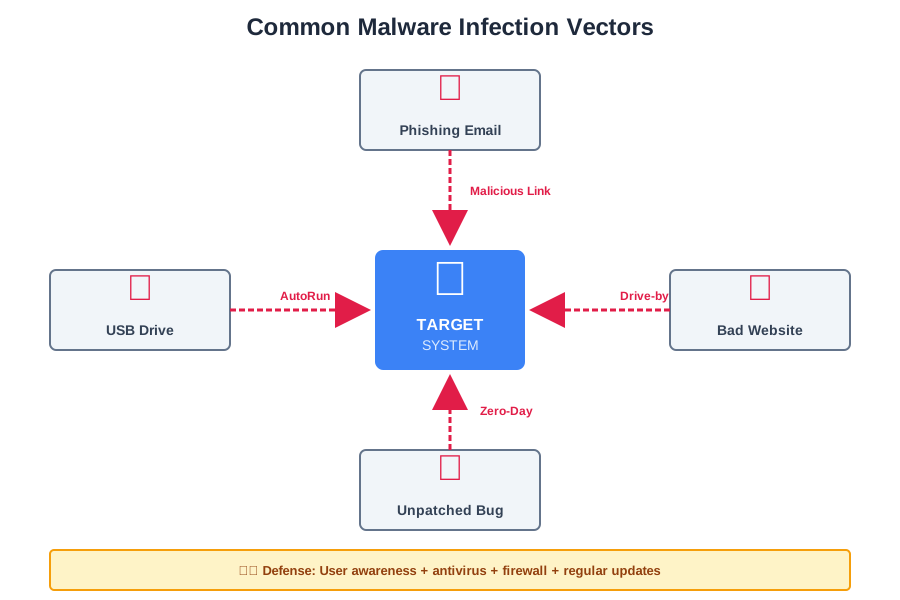
Malware Infection Methods
How does malware get into a system?
Phishing Emails 📧
Clicking on malicious links or attachments in fake emails.
Example: Email claiming to be from bank: "Your account is locked—click here to unlock."
Removable Media 💾
Plugging in infected USB drives or external hard disks.
How it spreads: AutoRun feature automatically executes malware when USB is inserted.
Software Vulnerabilities 🔓
Exploiting unpatched security flaws in the Operating System (Zero-Day attacks).
Example: WannaCry exploited Windows SMB vulnerability (EternalBlue).
Drive-by Downloads ðŸŒ
Visiting a compromised website that silently downloads malware without the user clicking anything.
How it works: Website contains malicious JavaScript that exploits browser vulnerabilities.
Impact of Malware
Data Loss ðŸ“
Files can be deleted, corrupted, or encrypted (Ransomware). Example: Ransomware encrypts family photos, making them inaccessible forever without decryption key.
Financial Loss 💸
Theft of banking credentials or payment of ransoms.
Statistics:
- ● Average ransomware payment: $200,000
- ● Banking trojans steal billions annually
- ● Cryptocurrency theft via malware
System Failure 💥
Overloading the CPU or network, causing crashes (DoS). Example: Worms consume all bandwidth, making network unusable for legitimate traffic.
Privacy Violation ðŸ‘️
Theft of personal photos, messages, and location data. Example: Spyware like Pegasus can access all smartphone data—messages, calls, camera, microphone, GPS.
Business Disruption ðŸ¢
Downtime costs thousands per minute for e-commerce and services. Example: Colonial Pipeline ransomware caused 6-day shutdown, fuel shortages across U.S. East Coast.
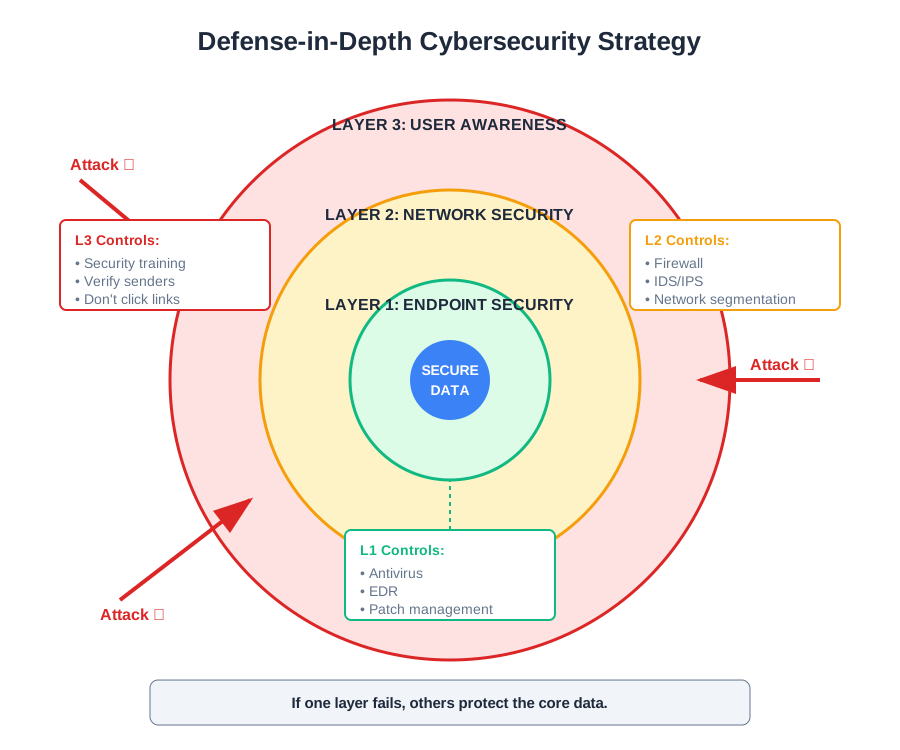
Malware Detection and Prevention
Security is a continuous process of defense.
Antivirus Software 🛡️
Scans files against a database of known malware signatures to detect and remove threats.
How it works:
- ● Signature-based detection (known malware patterns)
- ● Heuristic analysis (suspicious behavior)
- ● Real-time scanning of files
- ● Automatic updates of virus definitions
Popular Options: Windows Defender, Norton, Kaspersky, Bitdefender
Firewalls 🔥
Blocks unauthorized network connections that worms or Trojans use to communicate.
Types:
- ● Network firewall (hardware appliance)
- ● Host firewall (software on PC)
What it blocks:
- ● Incoming unauthorized connections
- ● Outgoing suspicious traffic (malware calling home)
Regular Updates (Patching) 🔄
Keeping the OS and software updated closes the security holes that malware exploits.
Why it matters: WannaCry exploited a Windows vulnerability that Microsoft patched 2 months earlier—victims who didn't update were infected.
Best practice: Enable automatic updates.
User Education 🎓
Training users to recognize Phishing emails and avoid downloading software from unknown sources.
Key lessons:
- ● Verify sender before clicking links
- ● Hover over links to see actual URL
- ● Don't open unexpected attachments
- ● Use strong, unique passwords
Statistics: 82% of breaches involve human error—education reduces this dramatically.
Sandboxing ðŸ–️
Running suspicious programs in an isolated environment to check their behavior before allowing them on the main system.
How it works:
- ● Virtual machine or isolated container
- ● Program runs with limited permissions
- ● Behavior analyzed for malicious activity
- ● If safe, allowed on real system
Use case: Security researchers analyze new malware safely in sandboxes.
Frequently Asked Questions (FAQ)
Conclusion
Malware is the primary weapon of cybercriminals, evolving constantly to bypass defenses. Understanding the types (Virus, Worm, Trojan, Ransomware, Spyware, Adware), infection vectors (phishing, USB, exploits), and defense strategies (antivirus, firewall, updates, education) is essential for protection.
Remember:
- ✅ Virus needs host, Worm travels alone (#1 exam question)
- ✅ Prevention is cheaper than recovery (backups defeat ransomware)
- ✅ Human awareness is the first defense (don't click suspicious links)
- ✅ Layered security (Defense-in-Depth) provides redundancy
- ✅ Keep everything updated (patches close security holes)
The best antivirus is between your ears—think before you click! 🧠🛡️