
Mobile Security
🎯 Key Takeaways & Definition
Definition: Mobile Security is the protection of smartphones, tablets, and laptops from threats associated with wireless computing.
Core Concept: Unlike traditional computers, mobile devices leave the safety of the corporate firewall. They are "Endpoints" that travel everywhere.
The Big Challenge: Balancing User Privacy (it's my personal phone) with Corporate Security (it has company email).
1. Definition of Mobile Security
Mobile security creates the strategy and tools to secure data on portable devices. Since these devices are easily lost or stolen and often connect to unsecured networks (like coffee shop Wi-Fi), they require a different security approach than a desktop computer sitting in a locked office.
Why Mobile Security Is Critical:
Scale of Mobile Computing (2026):
- • 6.8 billion smartphone users worldwide
- • 58% of web traffic from mobile devices
- • Average person checks phone 96 times per day
- • 70% of corporate email accessed via mobile
Unique Mobile Risks:
- • Always-on connectivity (24/7 attack surface)
- • Location tracking (GPS exposes physical location)
- • Physical portability (easy to lose/steal)
- • Personal + work data mixed on same device (BYOD)
- • App ecosystem (millions of apps, many malicious)
- • Wireless networks (Wi-Fi, Bluetooth vulnerabilities)
Statistics:
- • 1 in 36 mobile devices had high-risk app installed (Verizon 2025)
- • 27% of organizations experienced mobile security breach
- • Average cost of mobile breach: $2.1 million
2. Mobile-Specific Threats
Mobile devices face unique risks that desktop computers often do not.
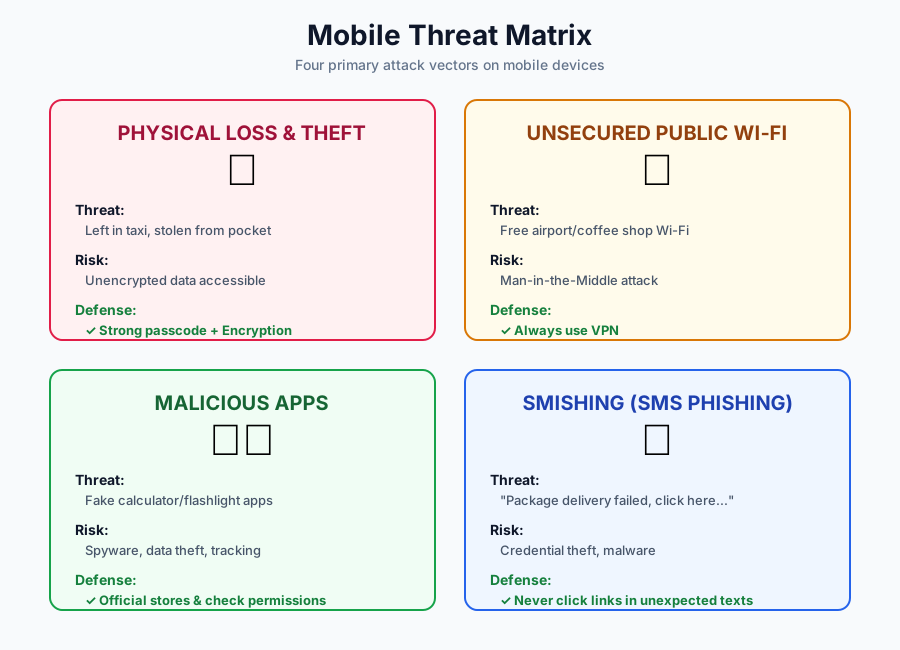
A. Physical Loss & Theft 📱
The Threat:
The #1 mobile risk isn't a hacker; it's leaving your phone in a taxi.
Statistics:
- • 70 million smartphones lost annually worldwide
- • Only 7% of lost phones returned to owner
- • 68% of lost devices not protected by password
- • Average value of data on phone: $30,000-$50,000
The Risk:
If the device is not encrypted or password-protected, the finder has access to all your data:
- • Banking apps (may stay logged in)
- • Email (corporate secrets)
- • Photos (personal/sensitive)
- • Passwords (if stored in notes)
- • Social media accounts
Defense:
- ✅ Strong passcode/biometric (fingerprint, Face ID)
- ✅ Full-disk encryption (enabled by default iOS 8+, Android 6+)
- ✅ Remote wipe capability (Find My iPhone, Android Device Manager)
- ✅ Auto-lock after 1-2 minutes inactivity
- ✅ Display contact info on lock screen ("If found, call...")
- ✅ Disable notification previews on lock screen (privacy)
B. Unsecured Public Wi-Fi 📶
The Threat:
Connecting to "Free Airport Wi-Fi" without a VPN.
How Attacks Work:
1. Man-in-the-Middle (MITM):
Your Phone → Attacker's Laptop → Airport Router → Internet
              ↑
         Intercepts all traffic
Attacker sees everything: passwords, emails, credit cards (if HTTP not HTTPS).
2. Evil Twin Attack:
Legitimate: "Starbucks WiFi"
Fake:       "Starbucks_WiFi" (attacker's hotspot)
Users connect to fake network, attacker sees all traffic.
3. Packet Sniffing: Tools like Wireshark capture unencrypted traffic on shared Wi-Fi.
What Attackers Can Steal:
- • Login credentials (HTTP sites)
- • Session cookies (hijack accounts)
- • Emails
- • File downloads
- • DNS queries (which sites you visit)
Defense:
- ✅ Use VPN on all public Wi-Fi (encrypts all traffic)
- ✅ HTTPS only (look for padlock icon)
- ✅ Disable auto-connect to Wi-Fi networks
- ✅ Forget networks after use
- ✅ Use cellular data for sensitive transactions (banking)
- ✅ Verify network name with staff (avoid "Free_WiFi" traps)
VPN Recommendations:
- • Corporate: Cisco AnyConnect, Palo Alto GlobalProtect
- • Personal: NordVPN, ExpressVPN, ProtonVPN
C. Malicious Apps 📲
The Threat:
Apps that look legitimate (like a Calculator or Flashlight) but secretly steal contacts or track location.
Common Malicious Behaviors:
- • Spyware: Records calls, texts, location
- • Adware: Displays intrusive ads
- • Banking trojans: Overlays fake login screens
- • Ransomware: Locks device, demands payment
- • Cryptominers: Uses CPU to mine cryptocurrency
Attack Vectors:
1. Fake Apps:
Legitimate: "WhatsApp Messenger" (Official)
Fake:       "WhasApp Messenger" (Typosquatting)
Looks identical, installs malware.
2. Over-Permissions:
Flashlight app requests:
✓ Camera (reasonable)
✗ Contacts (suspicious!)
✗ Location (why?!)
✗ Microphone (red flag!)
3. Sideloading: Installing apps from outside official stores (websites, APK files).
- • Bypasses security review
- • No malware scanning
- • Higher infection rate: 15x more malware than Play Store
Real Examples:
- • 2019: WhatsApp spyware (Pegasus) exploited zero-day vulnerability
- • 2020: 600 fake Android apps stole Facebook credentials
- • 2021: Joker malware in 500+ Play Store apps (billing fraud)
Defense:
- ✅ Download only from official stores (App Store, Play Store)
- ✅ Check developer name (is it verified?)
- ✅ Read reviews (look for "scam" warnings)
- ✅ Review permissions before installing (deny excessive requests)
- ✅ Avoid sideloading (unless absolutely necessary, from trusted source)
- ✅ Keep OS updated (patches vulnerabilities)
- ✅ Use mobile security app (Lookout, McAfee Mobile Security)
D. Smishing (SMS Phishing) 💬
The Threat:
Phishing attacks delivered via SMS text messages.
Common Scenarios:
"Your package couldn't be delivered. Click here: bit.ly/xyz123"
"Bank alert: Suspicious activity. Verify: account-verify.com"
"You've won a $1000 gift card! Claim now: gift-winner.co"
"IRS: You owe back taxes. Pay immediately or face arrest."
Why Smishing Works:
- • Higher open rate: 98% of texts read (vs 20% emails)
- • Trust factor: People trust SMS more than email
- • Smaller screen: Harder to verify URLs on mobile
- • Urgency: Creates panic ("act now!")
Defense:
- ✅ Never click links in unexpected texts
- ✅ Call company directly using official number (not number in text)
- ✅ Check sender: Is it a real phone number or random string?
- ✅ Look for typos: Legitimate companies proofread
- ✅ Report spam: Forward to 7726 (SPAM) in US
3. Mobile OS Security Models (Architecture)
How do iOS and Android protect you?
A. Sandboxing 📦
Definition:
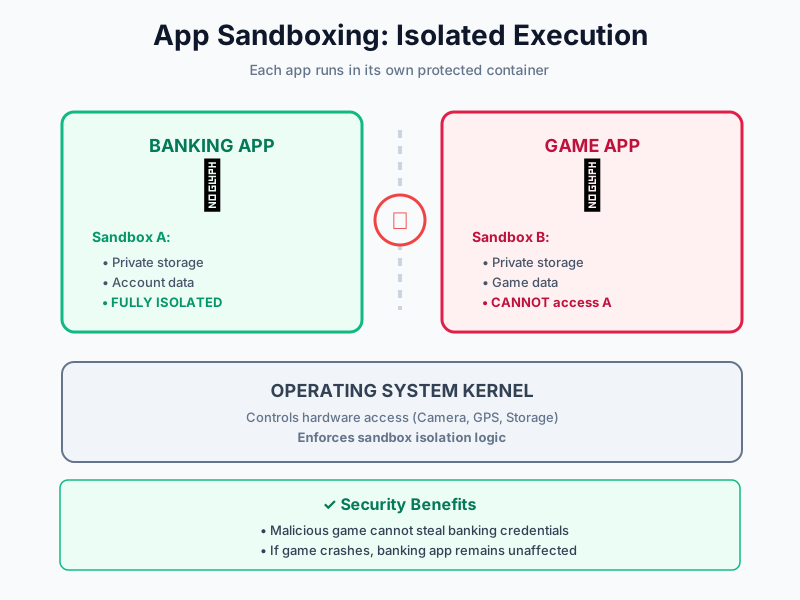
Running each app in its own isolated environment.
How It Works:
App A (Banking)
    ↓
Sandbox A (Isolated Container)
    • Private storage
    • Cannot access Sandbox B
    • Cannot access system files

App B (Game)
    ↓
Sandbox B (Isolated Container)
    • Private storage
    • Cannot access Sandbox A
Key Benefits:
- • App A cannot read App B's files (unless explicitly allowed via sharing APIs)
- • If game crashes or hacked, it cannot touch banking app
- • Malware contained (can't spread to other apps)
- • System integrity (apps can't modify OS)
Implementation:
- • iOS: Mandatory sandboxing (no exceptions)
- • Android: SELinux sandboxing (since Android 5.0)
Limitations:
- • Rooted/jailbroken devices: Sandbox broken (all apps can access everything)
- • Permission abuse: Apps can request permissions to escape sandbox legally
B. Permission Model ðŸ”
Definition:
The OS asks the user for consent before granting an app access to sensitive hardware/data.
Permission Categories:
1. Location:
- • Precise (GPS coordinates)
- • Approximate (city-level)
- • While using app
- • Always (background tracking)
2. Camera & Microphone:
- • Record video/audio
- • Take photos
3. Contacts & Photos:
- • Read contact list
- • Access photo library
4. Notifications:
- • Send push notifications
5. Storage:
- • Read/write files
Example Flow:
User opens Instagram
Instagram requests: "Allow access to Camera?"
Options: [Allow Once] [Allow While Using] [Don't Allow]
User selects: Allow While Using
Result: Instagram can access camera only when app open
Best Practices:
- ✅ Deny by default (grant only when needed)
- ✅ Review permissions regularly (Settings → Privacy)
- ✅ Revoke unused permissions (why does flashlight need contacts?)
- ✅ Prefer "While Using" over "Always" for location
iOS vs Android Permissions:
- • iOS: Granular per-permission prompts
- • Android: Group permissions (e.g., "Storage" includes read + write)
- • Android 11+: One-time permissions (resets after app closed)
4. BYOD (Bring Your Own Device)
Definition:
A policy where employees use their personal devices (smartphones/laptops) for work purposes.
The Problem:
Corporate data (sensitive emails) lives next to personal data (TikTok, Games) on the same device.
BYOD Risks:
1. Data Leakage:
Employee downloads confidential report to phone
Phone lost at gym
Finder accesses report (no password protection)
2. Insecure Apps:
Employee installs game with malware
Malware accesses corporate email (same device)
Malware exfiltrates customer data
3. Lost/Stolen Devices:
- • Personal device = no corporate tracking
- • Can't remote wipe without MDM
- • Employee may refuse wipe (personal photos)
4. Compliance:
- • HIPAA, GDPR require data protection
- • Personal devices harder to audit
- • Legal liability if breach occurs
The Solution: MDM (Mobile Device Management)
MDM Capabilities:
- • Separate work/personal data (containerization)
- • Enforce security policies (require passcode, encryption)
- • Remote wipe (only work data, not personal photos)
- • App whitelist/blacklist (block risky apps)
- • Monitor compliance (OS version, jailbreak detection)
- • Distribute apps (internal corporate apps)
How MDM Works:
1. Employee enrolls device in MDM
2. MDM creates "Work Profile" (separate container)
3. Work apps/data live in Work Profile
4. Personal apps/data remain separate
5. If employee leaves: MDM wipes only Work Profile
Popular MDM Solutions:
- • Microsoft Intune
- • VMware Workspace ONE
- • MobileIron (Ivanti)
- • Jamf (iOS-focused)
BYOD Policy Best Practices:
- ✅ Clear policy (what's allowed/prohibited)
- ✅ MDM enrollment mandatory for work access
- ✅ User training (security awareness)
- ✅ Privacy transparency (what can IT see?)
- ✅ Support (help desk for device issues)
- ✅ Exit process (remove work data when employee leaves)
⚠️ Rooting vs. Jailbreaking (Exam Focus)
| Feature | Rooting (Android) | Jailbreaking (iOS) |
|---|---|---|
| Definition | Gaining "Root" (Admin) access | Removing Apple's software restrictions |
| Goal | To modify the OS or delete system apps | To install apps not on the App Store |
| How | Exploit OS vulnerability or unlock bootloader | Exploit iOS vulnerability |
| Security Risk | High. Breaks Sandbox. Malware can access everything. | High. Disables code signing checks. |
| Warranty | Voids warranty | Voids warranty |
| Updates | Often blocks official OS updates | Often blocks official OS updates |
| Reversible | Yes (but may require factory reset) | Yes (restore via iTunes) |
| Verdict: Never use rooted/jailbroken device for banking or corporate work. | ||
Why It's Dangerous:
1. Sandbox Broken:
- • All apps can access all data
- • Malware spreads freely
2. No Code Signing:
- • Unsigned malicious code can run
- • No verification apps are legitimate
3. No Security Updates:
- • Rooting/jailbreaking often blocks official patches
- • Vulnerabilities remain unpatched
Legitimate Uses:
- • Custom ROMs (privacy-focused OS)
- • Remove bloatware
- • Advanced customization
- • Development/testing
Detection:
- • Banking apps often detect root/jailbreak and refuse to run
- • MDM can detect and block corporate access
5. Comparison: iOS vs. Android Security
| Feature | iOS (Apple) | Android (Google) |
|---|---|---|
| Ecosystem | Closed (Walled Garden). Only Apple hardware. | Open Source. Many manufacturers (Samsung, Pixel). |
| App Source | App Store only (strictly reviewed). | Play Store + Sideloading (Third-party). |
| App Review | Manual review by Apple (more thorough). | Automated scanning (faster but less thorough). |
| Malware Rate | Very low (~0.01%). | Higher (~15x more than iOS). |
| Updates | Simultaneous global rollout. Fast. | Dependent on manufacturer/carrier. Often delayed. |
| Update Support | 5-6 years of updates. | 2-3 years (varies by manufacturer). |
| Customization | Low. Security prioritized. | High. User freedom prioritized. |
| Rooting/Jailbreak | Difficult (Apple actively patches exploits). | Easier (many devices support unlocking). |
| Privacy | Strong (on-device processing, privacy labels). | Improving (Privacy Sandbox, but Google ads rely on data). |
| Enterprise Support | Good (Apple Business Manager). | Excellent (Android Enterprise). |
| Market Share | ~27% global (higher in US/Europe). | ~72% global. |
| Security Model | Mandatory sandboxing, strict permissions. | Sandboxing + SELinux, permissions improving. |
Which Is More Secure?
iOS Advantages:
- • Tighter control = fewer vulnerabilities
- • Faster updates (all devices simultaneously)
- • No sideloading (by default)
- • Stronger encryption (Secure Enclave)
Android Advantages:
- • Open source = community can audit code
- • Flexibility for power users
- • Better enterprise management tools
- • More affordable devices
Verdict:
iOS is generally more secure out-of-the-box due to closed ecosystem and consistent updates. Android can be equally secure with proper configuration (Pixel with timely updates, no sideloading, strong passwords).
For Enterprise: Both can be secured with MDM. Choice often depends on budget and user preference.
Conclusion
Mobile security is unique because the perimeter is gone—the device IS the perimeter. While Operating Systems (iOS/Android) provide strong built-in defenses like Sandboxing and Permissions, the biggest vulnerability remains the user.
Key Takeaways:
For Individuals:
Success relies on "Cyber Hygiene":
- ✅ Use strong passcodes/biometrics
- ✅ Avoid public Wi-Fi (or use VPN)
- ✅ Download only from official stores
- ✅ Review app permissions
- ✅ Keep OS updated
- ✅ Enable remote wipe capability
For Organizations:
Success relies on MDM (Mobile Device Management):
- ✅ Enforce security policies
- ✅ Separate work/personal data
- ✅ Remote wipe capability
- ✅ Monitor compliance
- ✅ User training
Final Verdict: A mobile device is a computer in your pocket; treat it with the same (or higher) security standards as your laptop.
The Future:
- • Zero-trust architecture for mobile
- • AI-powered threat detection
- • Enhanced biometrics (behavioral patterns)
- • Quantum-resistant encryption
- • 5G security challenges (IoT expansion)
Mobile devices are now the primary computing platform—securing them is no longer optional! 📱🔒