
SQL Triggers, Constraints & Active Databases Explained (2026)

Key Takeaways
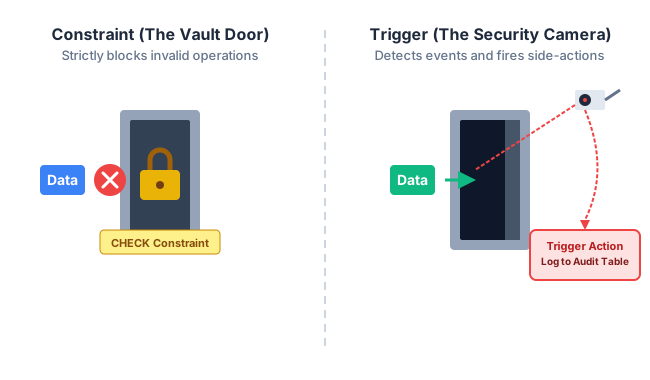
- Constraints = Locks, Triggers = Sensors — Constraints are static validation rules (the vault door that will not open for wrong input). Triggers are dynamic automated responses (the alarm that fires when the door opens).
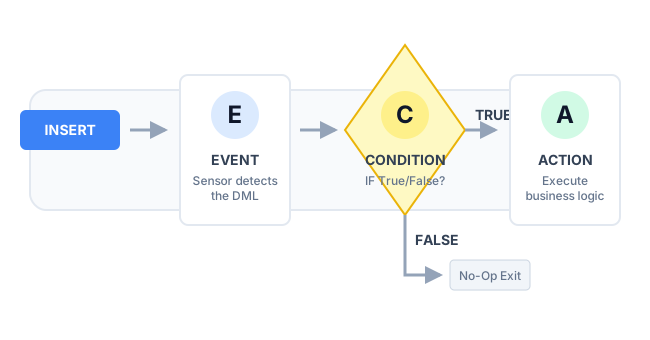
- ECA Framework — Every trigger follows the Event-Condition-Action model: an event is detected → a condition is evaluated → an action executes. If the condition is false, the trigger does nothing.
- BEFORE vs AFTER —
BEFOREtriggers fire before the row is written — use for validation and data formatting.AFTERtriggers fire after the commit — use for audit logging and cross-table cascades. - Row vs Statement Level — Row-level triggers fire once per affected row (dangerous on bulk operations). Statement-level triggers fire exactly once per SQL statement regardless of rows changed.
- Recursive Triggers Kill Servers — A trigger that causes the same event it listens for creates an infinite loop. Always design triggers with a termination condition and check for circular dependencies before deploying.
Constraints enforce static rules at the column/table level — CHECK, NOT NULL, UNIQUE, PRIMARY KEY, FOREIGN KEY — rejected instantly with zero overhead
Triggers are stored programs that fire automatically on INSERT/UPDATE/DELETE events — they implement logic no constraint can express
The ECA model (Event → Condition → Action) is the theoretical framework behind every trigger in every RDBMS
BEFORE triggers validate/transform data before it is written; AFTER triggers log changes and cascade effects after the commit
Row-level triggers execute once per row (dangerous for bulk DML); statement-level triggers execute once per statement (always safe)
Recursive triggers and mutating table errors are the two most dangerous production failure modes in active database design
What Are SQL Triggers and Constraints?
A traditional database is passive — it waits silently for an application to issue a command, executes it, and returns results. But enterprise systems cannot rely on developers to manually validate every write. If a malicious user bypasses the web application and injects SQL directly, or an ORM generates an incorrect query, a passive database has no defense.
The solution is an active database — one that monitors its own state and reacts automatically. Active databases enforce data integrity through two complementary mechanisms:
- Constraints — static, mathematical rules declared on columns or tables that the DBMS checks instantly on every write. They either allow the operation or block it with an error.
- Triggers — stored programs that automatically execute in response to specific data events. They can inspect, modify, log, and cascade changes far beyond what a simple constraint can express.
Complex Integrity Constraints: Domain, CHECK & Assertions
Before studying triggers, it is essential to understand the full range of integrity constraints the SQL standard provides. These are enforced by the DBMS engine at zero application-layer cost — they are the correct first tool for data validation.
Domain Constraints
A domain constraint restricts the set of valid values an attribute can hold. In SQL, this is expressed through the column's declared data type plus an optional CHECK clause. The domain is the first and cheapest line of defense — checked entirely in memory before any disk I/O.
-- Column-level domain constraint (evaluated on every INSERT/UPDATE)
CREATE TABLE Employee (
EmployeeID INT PRIMARY KEY,
Age INT CHECK (Age >= 18 AND Age <= 70),
Gender CHAR(1) CHECK (Gender IN ('M', 'F', 'X')),
Salary DECIMAL(12,2) CHECK (Salary >= 0),
Email VARCHAR(255) NOT NULL UNIQUE
);
Any INSERT or UPDATE violating these constraints is rejected with a constraint violation error — no trigger or application code needed
CHECK Constraints (Column-Level and Table-Level)
CHECK constraints can be written at the column level (referencing only that column) or at the table level (referencing multiple columns in a single logical expression). Table-level CHECK constraints are essential for cross-column validation.
-- Table-level CHECK: EndDate must be after StartDate (cross-column rule)
CREATE TABLE Project (
ProjectID INT PRIMARY KEY,
StartDate DATE NOT NULL,
EndDate DATE NOT NULL,
Budget DECIMAL(15,2) CHECK (Budget > 0),
CONSTRAINT chk_dates CHECK (EndDate > StartDate),
CONSTRAINT chk_budget_min CHECK (Budget >= 1000)
);
-- Adding a named CHECK constraint to an existing table
ALTER TABLE Employee
ADD CONSTRAINT chk_salary_range CHECK (Salary BETWEEN 15000 AND 5000000);
Assertions — Global Database Constraints
A SQL assertion is a named constraint applied at the database level, not to any specific table. It can reference any table and any condition. Assertions enforce invariants that must always hold true across the entire database — for example, “the number of enrolled students in any course must never exceed the course's capacity.”
-- SQL Standard assertion syntax (supported in DB2, PostgreSQL 9.x partial)
CREATE ASSERTION enrollment_cap_check
CHECK (NOT EXISTS (
SELECT CourseID
FROM Course c
WHERE (SELECT COUNT(*) FROM Enrollment e WHERE e.CourseID = c.CourseID)
> c.MaxCapacity
));
⚠ Note: Most DBMSs (MySQL, SQLite) do not support CREATE ASSERTION — use triggers instead
| Constraint Type | Scope | SQL Syntax | DBMS Support |
|---|---|---|---|
| NOT NULL | Single column | col TYPE NOT NULL | All RDBMS |
| UNIQUE | Column or column set | UNIQUE (col1, col2) | All RDBMS |
| PRIMARY KEY | Column or column set | PRIMARY KEY (col) | All RDBMS |
| FOREIGN KEY | Cross-table reference | REFERENCES Table(col) | All RDBMS |
| CHECK | Single column or table | CHECK (condition) | All RDBMS |
| ASSERTION | Entire database | CREATE ASSERTION ... CHECK | DB2, PostgreSQL (partial) |
SQL Triggers: BEFORE/AFTER, Row vs Statement Level
A SQL trigger is a named database object — a block of procedural SQL code — that the DBMS automatically executes when a specified data event occurs on a target table. Unlike constraints (which only validate), triggers can read other tables, modify data, raise errors, log changes, and send signals.
Every trigger is defined by three axes: its timing (BEFORE or AFTER), its event (INSERT, UPDATE, or DELETE), and its granularity (row-level or statement-level).
Trigger Syntax
-- General SQL trigger structure (PostgreSQL syntax)
CREATE [OR REPLACE] TRIGGER trigger_name
{ BEFORE | AFTER | INSTEAD OF }
{ INSERT | UPDATE [OF column] | DELETE }
ON table_name
[FOR EACH ROW] /* omit for statement-level */
[WHEN (condition)] /* optional ECA condition gate */
EXECUTE FUNCTION trigger_function();
-- SQL Server / MySQL syntax uses BEGIN...END inline block
CREATE TRIGGER trigger_name
{ BEFORE | AFTER } { INSERT | UPDATE | DELETE }
ON table_name
[FOR EACH ROW]
BEGIN
-- trigger body
END;
BEFORE Triggers — Validation & Data Formatting
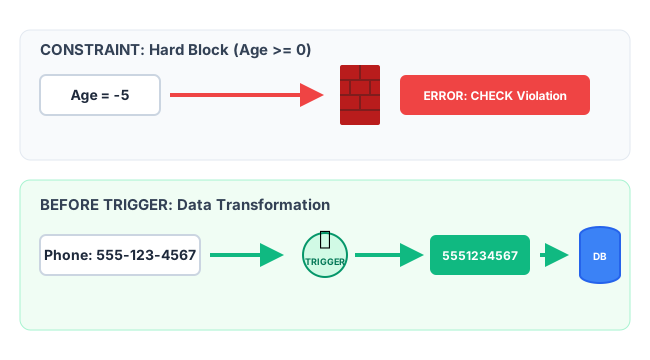
A BEFORE trigger fires before the DML statement modifies the actual table data. The trigger body can read and modify the NEW row values before they are committed. If the trigger raises an exception, the original DML operation is cancelled entirely.
Primary use cases: Input validation, automatic data normalization, enforcing business rules that CHECK constraints cannot express.
-- BEFORE INSERT: auto-strip formatting from phone numbers
CREATE TRIGGER normalize_phone
BEFORE INSERT OR UPDATE ON Customers
FOR EACH ROW
BEGIN
SET NEW.Phone = REGEXP_REPLACE(NEW.Phone, '[^0-9]', '');
/* 555-123-4567 → 5551234567, (555) 123 4567 → same */
IF LENGTH(NEW.Phone) <> 10 THEN
SIGNAL SQLSTATE '45000' SET MESSAGE_TEXT = 'Invalid phone number';
END IF;
END;
-- BEFORE UPDATE: block salary reduction without authorization flag
CREATE TRIGGER block_salary_cut
BEFORE UPDATE OF Salary ON Employee
FOR EACH ROW
BEGIN
IF NEW.Salary < OLD.Salary AND NEW.AuthorizedCut <> 1 THEN
SIGNAL SQLSTATE '45000' SET MESSAGE_TEXT = 'Salary reduction requires authorization';
END IF;
END;
AFTER Triggers — Audit Logging & Cascade Effects
An AFTER trigger fires after the DML statement has successfully committed its changes to the table. The data is already written. The trigger can now safely read the committed state and perform secondary operations — inserting into audit tables, updating summary tables, or notifying external systems.
Primary use cases: Audit trails, maintaining denormalized summary tables, enforcing complex referential rules across multiple tables.
-- AFTER DELETE: archive deleted employees to audit table
CREATE TRIGGER archive_deleted_employee
AFTER DELETE ON Employee
FOR EACH ROW
BEGIN
INSERT INTO Employee_Archive (
EmployeeID, Name, Salary, Department,
DeletedAt, DeletedBy
)
VALUES (
OLD.EmployeeID, OLD.Name, OLD.Salary, OLD.Department,
NOW(), CURRENT_USER()
);
END;
-- AFTER INSERT on Orders: update running total in summary table
CREATE TRIGGER update_revenue_summary
AFTER INSERT ON Orders
FOR EACH ROW
BEGIN
UPDATE Revenue_Summary
SET TotalRevenue = TotalRevenue + NEW.Amount,
OrderCount = OrderCount + 1
WHERE Month = DATE_FORMAT(NEW.OrderDate, '%Y-%m');
END;
Row-Level vs Statement-Level Triggers
The granularity of a trigger determines how many times it fires per SQL statement. This is one of the most performance-critical design decisions in active database engineering.
| Feature | Row-Level (FOR EACH ROW) | Statement-Level (default) |
|---|---|---|
| Fires Per | Once for every individual row affected by the DML | Exactly once per SQL statement regardless of rows affected |
| NEW / OLD Access | ✅ Yes — can read OLD and NEW column values for each row | ❌ No — no access to individual row values |
| Bulk DML Performance | DANGEROUS — UPDATE 1M rows = trigger fires 1M times | SAFE — fires exactly once regardless of affected rows |
| SQL Declaration | FOR EACH ROW (required keyword) | FOR EACH STATEMENT (or simply omit FOR EACH ROW) |
| Best For | Per-row validation, audit logging with old/new values, data formatting | DDL event logging, bulk operation counters, schema change auditing |
| Mutating Table Risk | HIGH — cannot SELECT from the triggering table | LOW — table is stable by the time it fires |
-- Statement-level: log that a bulk salary update occurred (fires once)
CREATE TRIGGER log_salary_batch_update
AFTER UPDATE OF Salary ON Employee
FOR EACH STATEMENT
BEGIN
INSERT INTO Audit_Log (EventType, EventTime, PerformedBy)
VALUES ('SALARY_BATCH_UPDATE', NOW(), CURRENT_USER());
END;
This fires once even if UPDATE Employee SET Salary = Salary * 1.1 affects 50,000 rows
INSTEAD OF Triggers — Making Views Updatable
An INSTEAD OF trigger completely intercepts a DML operation and replaces it with custom logic. The original INSERT/UPDATE/DELETE never reaches the table — only the trigger's body executes. They are almost exclusively used to make complex, multi-table SQL Views updatable.
By default, a view built from multiple joined tables is read-only — the DBMS cannot determine which underlying table to modify when the user issues an INSERT against the view. An INSTEAD OF trigger solves this by explicitly defining what should happen.
-- View joining two tables (normally read-only)
CREATE VIEW EmployeeDetails AS
SELECT e.EmployeeID, e.Name, e.Salary, d.DepartmentName
FROM Employee e JOIN Department d ON e.DeptID = d.DeptID;
-- INSTEAD OF INSERT: route the insert to the correct underlying table
CREATE TRIGGER instead_of_insert_emp
INSTEAD OF INSERT ON EmployeeDetails
FOR EACH ROW
BEGIN
DECLARE v_deptID INT;
SELECT DeptID INTO v_deptID FROM Department
WHERE DepartmentName = NEW.DepartmentName;
INSERT INTO Employee (Name, Salary, DeptID)
VALUES (NEW.Name, NEW.Salary, v_deptID);
END;
The ECA Model & Active Database Design
The theoretical foundation of all active database systems is the Event-Condition-Action (ECA) rule. Every trigger — regardless of the database vendor — implements this three-phase framework. Understanding it is critical for designing triggers that are correct, efficient, and do not cause catastrophic side effects.
ECA Components in Detail
| ECA Component | What It Is | SQL Implementation | Example |
|---|---|---|---|
| Event (E) | The state change that activates the trigger — a DML or DDL operation on a specific table | AFTER DELETE ON Employee | A row is deleted from the Employee table |
| Condition (C) | An optional logical predicate evaluated after the event. If false, the action is skipped entirely | WHEN (OLD.Status = 'Active') | Only archive the deletion if the employee was Active (not already terminated) |
| Action (A) | The procedural SQL block that executes when both the event fires and the condition is true | BEGIN INSERT INTO Archive ... END | Copy the deleted employee's record to the Archive table |
-- Complete ECA trigger: only archive Active employees when deleted
CREATE TRIGGER eca_archive_active_employee
AFTER DELETE ON Employee /* E: Event — DELETE on Employee */
FOR EACH ROW
WHEN (OLD.Status = 'Active') /* C: Condition — only active employees */
BEGIN /* A: Action */
INSERT INTO Employee_Archive
(EmployeeID, Name, Salary, DeletedAt, Reason)
VALUES
(OLD.EmployeeID, OLD.Name, OLD.Salary, NOW(), 'Terminated');
END;
DDL Triggers — Protecting Schema Integrity
DDL triggers fire in response to Data Definition Language events — CREATE, ALTER, and DROP statements. They are the DBA's last line of defense against accidental schema destruction in production environments.
-- SQL Server DDL trigger: block any DROP TABLE in production
CREATE TRIGGER prevent_table_drop
ON DATABASE
FOR DROP_TABLE
AS
BEGIN
PRINT 'ERROR: DROP TABLE is disabled on production. Contact your DBA.';
ROLLBACK;
END;
Advanced Engineering: Recursive Triggers & the Mutating Table Anomaly
Recursive Triggers — The Infinite Loop Trap
The greatest danger in active database design is the recursive trigger. If an UPDATE trigger on Table A modifies Table B, and Table B has a trigger that modifies Table A, the database enters an infinite execution loop — consuming all available memory, holding exclusive locks on both tables, and crashing the server.
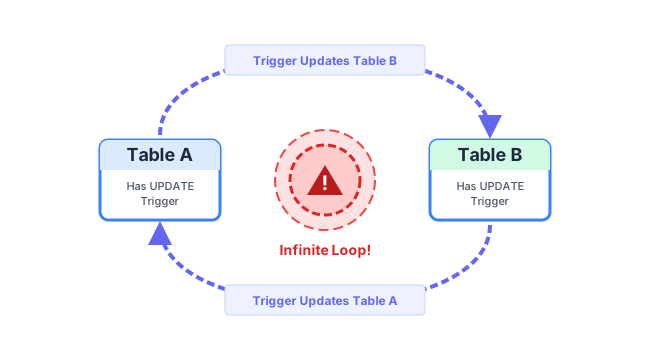
Most databases have safeguards: SQL Server allows configuring a maximum nesting depth (default 32), PostgreSQL sets a recursion depth limit, and MySQL can be configured to disable recursive triggers entirely. As an engineer, you must:
- Map all trigger dependencies before deploying in a trigger dependency graph
- Add a WHEN condition that prevents re-firing when the trigger itself caused the event (e.g.,
WHEN (NEW.UpdatedByTrigger IS NULL)) - Set a session variable flag at the start of the trigger body and check it as the first condition to prevent re-entry
The Mutating Table Anomaly
A mutating table is a table that is currently in an inconsistent, mid-change state because a DML statement is actively modifying it. Oracle Database (and some other RDBMS) enforces a strict rule: a row-level trigger cannot execute a SELECT against the same table it is currently modifying.
-- BROKEN: row-level trigger querying its own triggering table → ORA-04091
CREATE TRIGGER check_dept_budget
AFTER INSERT ON Employee FOR EACH ROW
BEGIN
-- ERROR: Employee table is mutating — cannot SELECT from it here
SELECT SUM(Salary) INTO v_total FROM Employee WHERE DeptID = NEW.DeptID;
END;
-- FIX: Use a statement-level trigger or an autonomous transaction
CREATE TRIGGER check_dept_budget_fix
AFTER INSERT ON Employee FOR EACH STATEMENT /* table is stable now */
BEGIN
SELECT SUM(Salary) INTO v_total FROM Employee WHERE DeptID = :new_dept;
END;
Real-World Case Study: The E-Commerce Price Glitch (Row-Level Trigger Overload)
| Aspect | Details |
|---|---|
| The Setup | A major online retailer implemented a BEFORE UPDATE row-level trigger on the Products table: if a seller dropped a price by more than 50%, block the update. The trigger contained an internal SELECT subquery to verify the discount against historical pricing data. |
| The Flaw | A seller uploaded a CSV bulk-pricing file to discount 100,000 seasonal items by 10%. The row-level trigger fired 100,000 individual times, each executing its own SELECT subquery. Total trigger execution time: 45 minutes for a single bulk update statement. |
| The Impact | The Products table held an exclusive write lock for 45 minutes. All checkout page queries trying to read product prices were blocked. The entire e-commerce platform was inaccessible. Estimated revenue loss: $2.3M. |
| The Fix | The row-level trigger was replaced with: (1) a lightweight CHECK constraint for the 50% rule on single updates, and (2) the bulk upload process was moved to an application-layer validation step that checked pricing rules in a single batch query before sending the UPDATE to the database. |
| The Lesson | Row-level triggers with subqueries are O(N) per statement. On 100,000-row bulk operations, they become catastrophic. Reserve row-level triggers for lightweight, single-row operations only. Move bulk validation to the application layer. |
Key Statistics & Industry Data (2026)
- Trigger Write Overhead — Heavy reliance on row-level SQL triggers reduces database write throughput (TPS) by up to 40% due to hidden procedural overhead and synchronous locking. (Source: PostgreSQL Performance Engineering Report, 2025)
- Trigger Deprecation in Microservices — Over 75% of modern microservice architectures have deprecated business-logic triggers, moving that logic to the application layer for easier version control, testing, and horizontal scaling. (Source: ThoughtWorks Technology Radar, 2025)
- CDC vs Trigger Audit — Replacing audit triggers with Change Data Capture (CDC) tools reduces CPU utilization on the primary database node by an average of 60% during peak write operations. (Source: Debezium Engineering Blog, 2026)
- CHECK Constraint Efficiency — Column-level CHECK constraints add <0.01ms overhead per row (entirely in-memory), making them 1000× cheaper than equivalent row-level trigger validation. Always prefer CHECK over a trigger when the rule is expressible as a predicate. (Source: Oracle Database Internals, 2025)
Where SQL Triggers & Constraints Are Applied
Audit Trails & Compliance
AFTER UPDATE/DELETE triggers copy changed rows to history tables, creating an immutable audit log required by GDPR, HIPAA, SOX compliance frameworks. Every change is traceable to a timestamp and user.
Automated Data Formatting
BEFORE INSERT triggers normalize phone numbers, capitalize names, strip whitespace, and enforce consistent formats before data reaches the table — eliminating the need for application-layer preprocessing.
Denormalized Summary Maintenance
AFTER INSERT triggers on transaction tables automatically update running totals, counters, and aggregate summary rows — allowing fast reads without expensive GROUP BY queries on large fact tables.
Complex Business Rule Enforcement
Business rules that span multiple tables (e.g., "total outstanding loans cannot exceed 5× annual salary") cannot be expressed as CHECK constraints — triggers evaluate these cross-table invariants on every relevant change.
Security & Intrusion Detection
DDL triggers log every schema modification — who ran it, when, and from which IP. This creates a tamper-evident audit trail for unauthorized production schema changes, a critical security control.
INSTEAD OF Trigger for View Updates
Complex views joining 3+ tables are read-only by default. INSTEAD OF triggers route user UPDATE/INSERT/DELETE operations against views to the correct underlying tables, making views fully interactive.
Advantages of Active Databases (Triggers & Constraints)
- Layer-Agnostic Enforcement — constraints and triggers fire regardless of the data source: ORM queries, raw SQL, CSV imports, stored procedures. No bypass is possible at the data layer
- Automation — critical tasks like audit logging, data formatting, and summary updates execute flawlessly without requiring application developers to remember to implement them
- Unbypassable Security — even if a malicious actor injects SQL directly into the database bypassing all application security, row-level triggers and constraints still enforce every rule
- Complex Logic Support — triggers can implement multi-table business rules, conditional formatting, and event-driven workflows that no static constraint can express
- Centralized Governance — database-level rules are defined once and apply universally — no risk of different application codebases implementing the same rule differently
Limitations & Pitfalls of Active Databases
- Hidden Logic — trigger code is invisible to application developers using ORMs; bugs caused by triggers are extremely difficult to trace because the code does not appear in application stack traces
- Performance Bottlenecks — row-level triggers on bulk INSERT/UPDATE operations fire O(N) times, creating lock contention that can bring production systems to a halt
- Recursive Trigger Danger — circular trigger dependencies create infinite loops that consume all database memory and hold table-level exclusive locks until the server crashes
- Vendor Lock-In — trigger syntax (PL/pgSQL for PostgreSQL, T-SQL for SQL Server, PL/SQL for Oracle) is completely non-portable; migrating database vendors requires a full trigger rewrite
- Debugging Complexity — triggers execute invisibly within a transaction; adding debugger breakpoints or logging is non-trivial, making production trigger bugs notoriously slow to resolve
- Assertion Limited Support — the SQL standard CREATE ASSERTION command is only partially implemented in major databases; complex global constraints must be reimplemented as triggers
Quick Reference Cheat Sheet
The entire triggers and constraints topic in one scannable table.
| Term | Definition | Exam Tip |
|---|---|---|
| CHECK Constraint | Validates column values against a boolean expression on every write | Can be column-level (one col) or table-level (cross-column). Named with CONSTRAINT keyword |
| ASSERTION | A database-wide constraint using CREATE ASSERTION — checks any table, any condition | Not widely supported (not MySQL/SQLite) — use triggers as an alternative |
| BEFORE Trigger | Fires before the DML writes to disk — can modify NEW row values or cancel the operation | Use for validation, formatting, enrichment. Access: NEW.col (UPDATE/INSERT) and OLD.col (UPDATE/DELETE) |
| AFTER Trigger | Fires after the DML has committed — data is already written; performs secondary operations | Use for audit logging, summary table updates, cross-table cascades |
| INSTEAD OF Trigger | Completely replaces the DML — original operation never executes | Used exclusively to make complex multi-table views updatable |
| FOR EACH ROW | Row-level trigger — fires once per affected row | Dangerous on bulk DML; O(N) executions. Gives access to OLD and NEW |
| FOR EACH STATEMENT | Statement-level trigger — fires exactly once per SQL statement | Safe for bulk DML; no access to OLD/NEW individual row values |
| ECA Model | Event-Condition-Action — the theoretical framework of all active database rules | Every trigger maps directly: event = AFTER DELETE; condition = WHEN clause; action = BEGIN...END |
| Mutating Table | A table mid-modification — row-level triggers cannot SELECT from it (ORA-04091) | Fix: use statement-level trigger or collect rows before the DML fires |
| Recursive Trigger | Trigger A modifies Table B → B's trigger modifies Table A → infinite loop | Prevent with WHEN guard flags or maximum nesting depth settings |
| CDC | Change Data Capture — reads database transaction logs instead of using triggers for auditing | Zero overhead on primary DB; tools: Debezium, AWS DMS, pglogical |
Frequently Asked Questions (FAQ)
Q.Can I manually execute a SQL trigger?
Q.What is the difference between a Stored Procedure and a Trigger?
Q.What is the difference between a BEFORE trigger and an AFTER trigger?
Q.What are the NEW and OLD keywords in a trigger?
Q.What is a mutating table error?
Q.Should I put all business rules inside triggers?
Q.How do I disable a trigger without deleting it?
Related Topics
Test Your Knowledge
Ready to prove your skills? Take our rigorous multiple-choice quiz designed to test your understanding of this topic and prepare you for interviews.