
SQL Joins, Subqueries & Aggregation Operators Explained (2026)

Key Takeaways
- Joins Reconnect Normalized Data — Relational databases split data across tables; JOINs reconnect them at query time using shared key columns — without ever duplicating stored data.
- SQL Execution Order — FROM/JOIN → WHERE → GROUP BY → HAVING → SELECT. Knowing this prevents common errors like using aggregate functions in a WHERE clause.
- HAVING ≠ WHERE —
WHEREfilters rows before aggregation.HAVINGfilters grouped buckets after aggregation. They are not interchangeable. - Correlated Subqueries Are Dangerous — A correlated subquery re-executes for every row of the outer query — O(N²) complexity on large tables. Always refactor them into JOINs or window functions.
- NULL Uses Three-Valued Logic — NULL = NULL evaluates to UNKNOWN, not TRUE. Always use
IS NULL— never the=operator — to test for missing values.
SQL JOINs combine rows from two or more tables using a shared key column — INNER JOIN returns only matched rows, LEFT JOIN keeps all left rows
UNION, INTERSECT, and EXCEPT are set operators that combine or compare entire result sets from compatible queries
Subqueries nest one SELECT inside another; correlated subqueries reference outer query columns and re-execute per row — avoid them on large tables
COUNT, SUM, AVG, MIN, MAX are aggregation functions — always paired with GROUP BY to compute per-group results
WHERE filters individual rows before aggregation; HAVING filters grouped results after aggregation — using them wrong is one of the most common SQL mistakes
NULL in SQL is not zero or empty string — it means unknown, and any comparison with NULL returns UNKNOWN, not TRUE or FALSE
What Are SQL Joins, Subqueries & Aggregations?
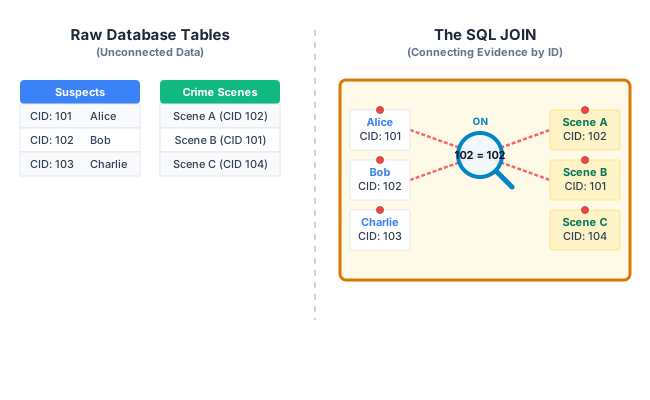
Storing data in a relational database requires normalizing it into dozens of strict, isolated tables to eliminate redundancy. A Customer table holds only customer details. An Orders table holds only order details. A Products table holds only product details.
But when a business analyst asks “How much did our top 10 customers spend last month, broken down by product category?”, that answer does not exist in any single table. To reconstruct this shattered data into a meaningful report, SQL relies on three powerful tools:
- Joins — clauses that combine rows from two or more tables based on a matching key column between them
- Subqueries — queries nested inside another query to perform multi-step data filtering before the final result is computed
- Aggregations — mathematical functions (like
SUMorCOUNT) that collapse multiple rows into a single summarized value per group
How SQL Queries Execute: The Logical Order
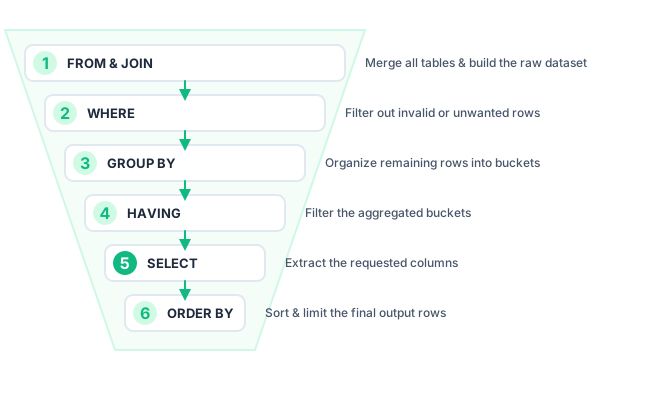
When you write a complex SQL query, you write it in a human-readable order: SELECT ... FROM ... WHERE ... GROUP BY ... HAVING ... ORDER BY. But the DBMS executes the clauses in a completely different, mathematically rigorous order:
| Step | Clause | What Happens | Common Mistake |
|---|---|---|---|
| 1 | FROM / JOIN | Identifies all source tables and physically matches rows based on the ON condition, creating one large intermediate result set in memory | Forgetting the ON clause → CROSS JOIN explosion |
| 2 | WHERE | Scans the combined table and removes individual rows that do not pass the filter condition | Using aggregate functions in WHERE → error (aggregation hasn't happened yet) |
| 3 | GROUP BY | Sorts and clusters the remaining rows into buckets based on matching column values | Selecting a non-aggregated column that isn't in GROUP BY → undefined behavior |
| 4 | HAVING | Filters the grouped buckets — removes groups that do not meet the aggregate condition | Using HAVING without GROUP BY → filters the entire set as one group |
| 5 | SELECT | Evaluates expressions and aggregate functions on the surviving buckets; extracts the final columns | Using a column alias defined here in a HAVING clause → alias not yet defined |
| 6 | ORDER BY / LIMIT | Sorts the final result set and truncates it to the requested row count | Using LIMIT without ORDER BY → non-deterministic result set every run |
UNION, INTERSECT, and EXCEPT — SQL Set Operators
SQL set operators combine the result sets of two or more SELECT queries. Unlike JOINs (which combine columns from different tables horizontally), set operators stack results vertically. Both queries must return the same number of columns with compatible data types.
UNION and UNION ALL
UNION combines the results of two queries and automatically removes duplicate rows. UNION ALL keeps all duplicates, making it significantly faster because it skips the deduplication step.
-- All employees from two merged companies (deduped)
SELECT Name, Department FROM CompanyA_Employees
UNION
SELECT Name, Department FROM CompanyB_Employees;
-- Use UNION ALL when duplicates are intentional (e.g., counting all transactions)
SELECT ProductID FROM Sales_Jan UNION ALL SELECT ProductID FROM Sales_Feb;
INTERSECT
INTERSECT returns only the rows that appear in both result sets — the mathematical intersection. It is the SQL equivalent of the overlapping center of a Venn diagram.
-- Students enrolled in BOTH Math AND Physics
SELECT StudentID FROM Enrollment WHERE CourseID = 'MATH101'
INTERSECT
SELECT StudentID FROM Enrollment WHERE CourseID = 'PHY101';
EXCEPT (MINUS)
EXCEPT (called MINUS in Oracle) returns rows that appear in the first result set but not in the second. It is used for finding differences — rows unique to the first query.
-- All customers who placed orders BUT have never left a review
SELECT CustomerID FROM Orders
EXCEPT
SELECT CustomerID FROM Reviews;
Nested Queries: IN, EXISTS, ANY, ALL & Correlated Subqueries
A subquery (also called a nested query or inner query) is a complete SELECT statement written inside the parentheses of another SQL statement. The outer query uses the result of the inner query to complete its own operation.
IN — Membership Test
The IN operator tests whether a value matches any value in a subquery result set. The subquery executes once, its result is cached, and the outer query uses it as a lookup list.
-- Find all customers who live in a city that has a warehouse
SELECT CustomerName FROM Customers
WHERE City IN (SELECT City FROM Warehouses);
EXISTS — Existence Check
EXISTS returns TRUE if the subquery returns at least one row — it does not care about the actual values. It is the most efficient operator for a "does a related record exist?" check, because the database engine stops scanning as soon as one match is found.
-- Find all customers who have placed AT LEAST ONE order
SELECT CustomerName FROM Customers c
WHERE EXISTS (
SELECT 1 FROM Orders o WHERE o.CustomerID = c.CustomerID
);
SELECT 1 is a convention — EXISTS only checks if a row is returned, not its value
ANY and ALL — Scalar Comparison
ANY returns TRUE if the comparison is true for at least one value in the subquery result. ALL returns TRUE only if the comparison is true for every value.
-- Products cheaper than ANY product in the 'Electronics' category
SELECT Name, Price FROM Products
WHERE Price < ANY (SELECT Price FROM Products WHERE Category = 'Electronics');
-- Products cheaper than ALL products in the 'Electronics' category (cheapest of all)
SELECT Name, Price FROM Products
WHERE Price < ALL (SELECT Price FROM Products WHERE Category = 'Electronics');
Correlated Subqueries — The Performance Trap
A correlated subquery references a column from the outer query inside the inner query. This dependency means the inner query cannot be executed once and cached — it must re-execute for every single row processed by the outer query, making it inherently O(N²).
-- SLOW: Correlated subquery re-runs for every employee row
SELECT EmployeeName, Salary FROM Employees e
WHERE Salary > (
SELECT AVG(Salary) FROM Employees
WHERE Department = e.Department /* references outer e.Department */
);
-- FAST: Refactored as a JOIN with a pre-computed subquery (runs once)
SELECT e.EmployeeName, e.Salary
FROM Employees e
JOIN (SELECT Department, AVG(Salary) AS AvgSal FROM Employees GROUP BY Department) d
ON e.Department = d.Department
WHERE e.Salary > d.AvgSal;
Aggregation: COUNT, SUM, AVG, MIN, MAX, GROUP BY & HAVING
Aggregation functions collapse a set of rows into a single scalar value. They are always used in conjunction with GROUP BY to produce per-group summaries, or without GROUP BY to aggregate the entire table.
Core Aggregate Functions
| Function | What It Returns | NULL Handling | Example |
|---|---|---|---|
| COUNT(*) | Total number of rows in the group | Includes NULL rows | COUNT(*) on 5 rows → 5 |
| COUNT(col) | Number of non-NULL values in the column | Ignores NULLs | 4 if one row has NULL in that column |
| SUM(col) | Total of all numeric values in the group | Ignores NULLs | SUM(Price) → total revenue |
| AVG(col) | Mathematical mean (SUM ÷ COUNT of non-NULLs) | Ignores NULLs — may skew average | AVG(Rating) → mean product rating |
| MAX(col) | Highest value in the group | Ignores NULLs | MAX(OrderDate) → most recent order |
| MIN(col) | Lowest value in the group | Ignores NULLs | MIN(Salary) → lowest-paid employee |
GROUP BY and HAVING in Practice
-- Total revenue per department, only for departments with revenue > $50,000
SELECT Department,
COUNT(*) AS TotalOrders,
SUM(Amount) AS TotalRevenue,
AVG(Amount) AS AverageOrderValue
FROM Orders
WHERE OrderDate >= '2026-01-01' /* Step 2: filter rows first */
GROUP BY Department /* Step 3: cluster into buckets */
HAVING SUM(Amount) > 50000 /* Step 4: filter buckets */
ORDER BY TotalRevenue DESC
LIMIT 10;
NULL Values & Three-Valued Logic
NULL in SQL does not mean zero, empty string, or false. It means unknown — the value is absent or not applicable. This seemingly simple distinction causes a category of SQL bugs that are notoriously difficult to debug because NULL behaves differently from all other values.
Three-Valued Logic (3VL)
Standard boolean logic has two values: TRUE and FALSE. SQL adds a third: UNKNOWN. Any arithmetic operation, comparison, or logical expression involving NULL produces UNKNOWN — not TRUE and not FALSE.
| Expression | Result | Why |
|---|---|---|
| NULL = NULL | UNKNOWN | Two unknowns cannot be confirmed equal |
| NULL <> NULL | UNKNOWN | Two unknowns cannot be confirmed different |
| NULL = 5 | UNKNOWN | An unknown value might or might not equal 5 |
| NULL IS NULL | TRUE | IS NULL is the correct operator for NULL testing |
| 5 + NULL | NULL | Adding unknown to anything yields unknown |
| NULL OR TRUE | TRUE | TRUE regardless of what the unknown is |
| NULL AND FALSE | FALSE | FALSE regardless of what the unknown is |
-- WRONG: Returns no rows even if ManagerID is NULL (NULL = NULL → UNKNOWN)
SELECT * FROM Employees WHERE ManagerID = NULL;
-- CORRECT: Use IS NULL
SELECT * FROM Employees WHERE ManagerID IS NULL;
-- COALESCE replaces NULL with a default value (safe for aggregations)
SELECT Name, COALESCE(Bonus, 0) AS Bonus FROM Employees;
SQL Joins: INNER, LEFT, RIGHT & FULL OUTER JOIN
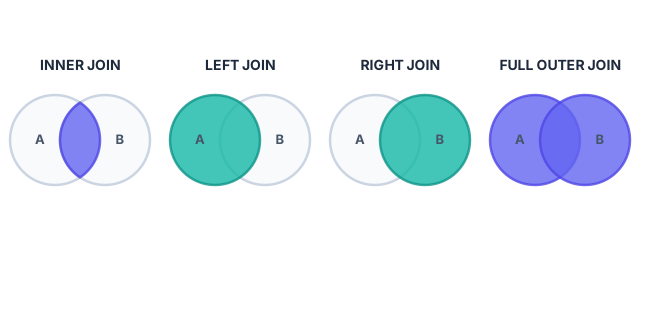
SQL JOIN types differ in how they handle rows that have no matching counterpart in the other table. Understanding which join type to use is one of the most impactful decisions in query design.
INNER JOIN
Returns only rows where a match exists in both tables. Rows with no counterpart on either side are completely dropped. It is the most common join and the default when you write just JOIN.
-- Returns only customers who HAVE placed at least one order
SELECT c.CustomerName, o.OrderDate, o.Amount
FROM Customers c
INNER JOIN Orders o ON c.CustomerID = o.CustomerID;
LEFT (OUTER) JOIN
Returns all rows from the left table, and the matched rows from the right table. If there is no match, the right-side columns are filled with NULL. This is the join used to find “everything from Table A, with Table B data where available.”
-- ALL customers, plus their orders if they have any (new customers show NULL for order columns)
SELECT c.CustomerName, o.OrderDate, o.Amount
FROM Customers c
LEFT JOIN Orders o ON c.CustomerID = o.CustomerID;
-- Classic pattern: find customers with NO orders (anti-join)
SELECT c.CustomerName FROM Customers c
LEFT JOIN Orders o ON c.CustomerID = o.CustomerID
WHERE o.CustomerID IS NULL;
FULL OUTER JOIN
Returns all rows from both tables. Where a row from the left has no match on the right, the right columns are NULL. Where a row from the right has no match on the left, the left columns are NULL. Use this to find unmatched records on either side.
| Feature | INNER JOIN | LEFT JOIN | FULL OUTER JOIN |
|---|---|---|---|
| Data Returned | Intersection only (matched rows) | All left rows + right matches | All rows from both tables |
| Unmatched Rows | Dropped completely | Left kept; right = NULL | Both kept with NULLs on missing side |
| Result Size | ≤ smaller table size | ≥ left table size | ≥ larger table size |
| Primary Use Case | Customers WITH orders | All customers, orders optional | Reconciling two data sources |
Complex SQL Query Examples
Real-world queries combine joins, subqueries, and aggregations in a single statement. Here are three production-level examples:
Example 1 — Top 5 Revenue-Generating Customers (Last 90 Days)
SELECT
c.CustomerName,
COUNT(o.OrderID) AS TotalOrders,
SUM(o.Amount) AS TotalRevenue,
AVG(o.Amount) AS AvgOrderValue
FROM Customers c
INNER JOIN Orders o ON c.CustomerID = o.CustomerID
WHERE o.OrderDate >= CURRENT_DATE - INTERVAL '90 days'
GROUP BY c.CustomerID, c.CustomerName
HAVING SUM(o.Amount) > 1000
ORDER BY TotalRevenue DESC
LIMIT 5;
Example 2 — Employees Earning Above Department Average (Subquery)
SELECT e.EmployeeName, e.Department, e.Salary, dept_avg.AvgSalary
FROM Employees e
JOIN (
SELECT Department, ROUND(AVG(Salary), 2) AS AvgSalary
FROM Employees
GROUP BY Department
) dept_avg ON e.Department = dept_avg.Department
WHERE e.Salary > dept_avg.AvgSalary
ORDER BY e.Department, e.Salary DESC;
Example 3 — Full Product Report with LEFT JOIN (Including Products with No Sales)
SELECT
p.ProductName,
p.Category,
COALESCE(COUNT(s.SaleID), 0) AS TotalSales,
COALESCE(SUM(s.Revenue), 0) AS TotalRevenue
FROM Products p
LEFT JOIN Sales s ON p.ProductID = s.ProductID
AND s.SaleDate BETWEEN '2026-01-01' AND '2026-06-30'
GROUP BY p.ProductID, p.ProductName, p.Category
ORDER BY TotalRevenue DESC;
COALESCE handles NULL from LEFT JOIN — unsold products show 0 instead of NULL
Advanced Engineering: Hash Joins & the N+1 Problem
Hash Join vs. Nested Loop Join
When you write a JOIN, the DBMS query optimizer must choose a physical algorithm to execute it. The choice has dramatic performance consequences:
| Algorithm | Mechanism | Complexity | Best For |
|---|---|---|---|
| Nested Loop Join | For every row in Table A, scan every row in Table B to find a match | O(N × M) | Very small tables or when one table has a selective index |
| Hash Join | Build a hash table from the smaller table, then probe it for each row of the larger table | O(N + M) | Large tables without index on the join key — the modern default |
| Merge Join | Both tables are sorted on the join key; then a single linear scan merges them | O(N log N) | When both sides are already sorted (index scans) |
If both tables have 1 million rows, a Nested Loop Join requires 1 trillion operations. A Hash Join builds a 1M-entry hash table in one pass and resolves all lookups in O(1) — completing in 2 million operations total. This is why the optimizer chooses Hash Joins by default on large, unindexed tables.
Real-World Case Study: The N+1 Query Performance Collapse
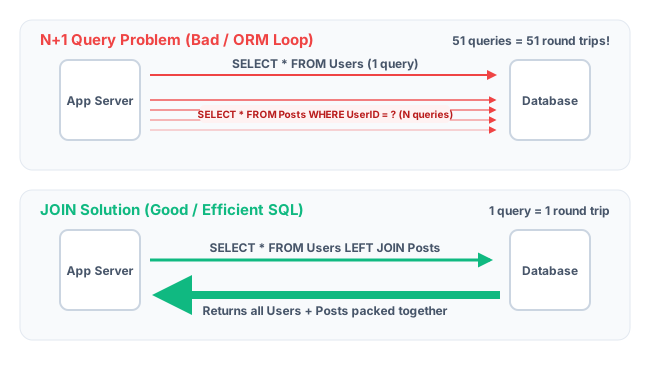
The most common database performance crisis in production applications is the N+1 Query Problem — a direct consequence of treating the database as if it were a correlated subquery rather than a set-based engine.
| Aspect | Details |
|---|---|
| The Setup | A popular social media application used an ORM (Object-Relational Mapper) to load a user profile and their latest 50 posts. The ORM generated SQL automatically. |
| The Flaw | Instead of one LEFT JOIN, the ORM executed 1 query to fetch the user, then 50 separate individual queries to fetch each post — the N+1 pattern. Each post was fetched as if it were a correlated subquery re-running per item. |
| The Impact | 10,000 concurrent logins generated 510,000 separate SQL queries against the database in under 60 seconds. The connection pool exhausted. The database CPU locked at 100%. The entire platform crashed. |
| The Fix | One properly structured LEFT JOIN query returning 50 rows replaced 50 separate SELECT statements. Query count: 510,000 → 10,000. CPU utilization: 100% → 12%. |
| The Lesson | Databases are architecturally optimized for set-based operations (JOINs), not iterative loops. Always audit your ORM-generated SQL on production-scale datasets before launch. Use query logging to detect N+1 patterns in staging. |
Key Statistics & Industry Data (2026)
- Hash Join Performance — Properly utilizing Hash Joins over Nested Loop Joins reduces large-scale database query execution times by an average of 85% on unindexed join columns. (Source: PostgreSQL Query Planner Benchmarks, 2025)
- N+1 Problem Prevalence — Over 70% of backend application performance bottlenecks are traced to unoptimized database access patterns (N+1, correlated subqueries) rather than application code inefficiencies. (Source: Datadog State of DevOps Report, 2025)
- Columnar Aggregation Speed — Columnar data warehouses (Snowflake, BigQuery, Redshift) process GROUP BY aggregations up to 100× faster than traditional row-based SQL engines for analytical workloads. (Source: Snowflake Engineering Blog, 2026)
- JOIN Frequency — Analysis of 50,000 production SQL queries across enterprise applications found that 94% of non-trivial queries include at least one JOIN, making join optimization the highest-ROI database skill. (Source: Brentozar.com Annual SQL Survey, 2025)
- NULL Bug Frequency — NULL handling errors account for an estimated 23% of all data integrity bugs in production SQL systems — the majority from using
= NULLinstead ofIS NULL. (Source: IEEE Software Engineering Research, 2025)
Where SQL Joins & Aggregations Are Applied
Financial Reporting
Monthly revenue reports are generated by JOINing a Transactions table to a Customers table, then applying SUM(Amount) GROUP BY Month — the canonical aggregation use case.
E-Commerce Analytics
Recommendation engines JOIN Users, Orders, and Products tables to compute "customers who bought X also bought Y" correlation scores using GROUP BY and COUNT aggregations.
Healthcare Records
Patient diagnosis reports JOIN patient demographics, prescriptions, and diagnostic results across multiple normalized tables — requiring FULL OUTER JOINs to detect missing records.
Business Intelligence Dashboards
Every chart in a BI dashboard (Tableau, Power BI, Metabase) executes GROUP BY + aggregate queries under the hood. Understanding aggregation is mandatory for BI engineering.
Data Cleanup Operations
Subqueries inside DELETE and UPDATE statements find and remove duplicate records, inactive users, or orphaned rows that referential integrity failed to catch in legacy systems.
Data Warehouse ETL Pipelines
Extract-Transform-Load (ETL) pipelines use UNION ALL to merge data from multiple source tables and INTERSECT/EXCEPT to identify new, changed, and deleted records between runs.
Advantages of SQL Joins & Aggregations
- Data Normalization Compatibility — JOINs allow data to be stored in normalized, non-redundant tables without sacrificing the ability to query it as a unified whole
- Set-Based Performance — A single JOIN query returning 10,000 rows is exponentially more efficient than 10,000 individual SELECT queries hitting the network
- Business Intelligence Power — Aggregation functions turn millions of raw transaction rows into board-level KPI reports in milliseconds
- Declarative Logic — You describe the data you want, not how to navigate to it — the query optimizer finds the most efficient physical path automatically
- Flexibility — Any combination of JOINs, subqueries, and aggregations can express virtually any business question against the data
- Standard SQL — All join and aggregation syntax is ISO/ANSI SQL standard, portable across PostgreSQL, MySQL, Oracle, SQL Server, and SQLite
Limitations & Pitfalls
- High CPU Cost — Large INNER JOINs across unindexed tables or deeply nested correlated subqueries are the #1 cause of database server crashes in production
- Cartesian Product Risk — Forgetting the ON clause in any JOIN produces a CROSS JOIN — 1,000 × 1,000 rows = 1,000,000 rows — exhausting memory in seconds
- N+1 Query Trap — ORMs and application code loops that trigger individual queries per row silently destroy database performance at scale
- NULL Complexity — Three-valued logic makes WHERE and JOIN conditions involving NULL columns subtly incorrect if not handled explicitly with IS NULL and COALESCE
- Readability Degradation — Queries with 5+ joins, nested subqueries, and multiple HAVING conditions become nearly unmaintainable without careful documentation and formatting
Quick Reference Cheat Sheet
The entire advanced SQL topic in one scannable table — bookmark this for exams and interviews.
| Term / Operator | Definition | Exam Tip |
|---|---|---|
| INNER JOIN | Returns rows with a matching key in both tables; drops unmatched rows | Result size ≤ smaller table size |
| LEFT JOIN | All left rows + matched right rows; unmatched right = NULL | Add WHERE right.col IS NULL to make an anti-join |
| FULL OUTER JOIN | All rows from both tables; unmatched sides = NULL | Not supported in MySQL — emulate with UNION of LEFT + RIGHT JOIN |
| UNION / UNION ALL | Stacks result sets vertically; UNION deduplicates, UNION ALL keeps all | Both queries must have same column count and compatible types |
| INTERSECT | Returns rows in both result sets (the overlap) | Equivalent to INNER JOIN on the same column |
| EXCEPT | Returns rows in first set not in second set (the difference) | Called MINUS in Oracle SQL |
| GROUP BY | Clusters rows with identical column values into summary buckets | Every non-aggregated SELECT column must appear in GROUP BY |
| HAVING | Filters grouped buckets after aggregation (WHERE filters before) | HAVING SUM(x) > 100 — not WHERE SUM(x) > 100 |
| Correlated Subquery | Subquery that references outer query columns — re-executes per outer row | Always O(N²) — refactor into a JOIN with a pre-computed subquery |
| EXISTS | Returns TRUE if subquery returns ≥1 row — stops at first match | Faster than IN on large result sets — use SELECT 1 in subquery |
| NULL IS NULL | Only TRUE way to test for NULL — NULL = NULL returns UNKNOWN | Use COALESCE(col, default) to replace NULL in calculations |
Frequently Asked Questions (FAQ)
Q.What is the difference between WHERE and HAVING in SQL?
Q.Which is faster — a JOIN or a Subquery?
Q.What is a Self Join in SQL?
Q.Can I join three or more tables in a single SQL query?
Q.What happens if I forget the ON condition in a JOIN?
Q.What is the difference between UNION and UNION ALL?
Q.Why does NULL = NULL return FALSE in SQL?
Related Topics
Test Your Knowledge
Ready to prove your skills? Take our rigorous multiple-choice quiz designed to test your understanding of this topic and prepare you for interviews.